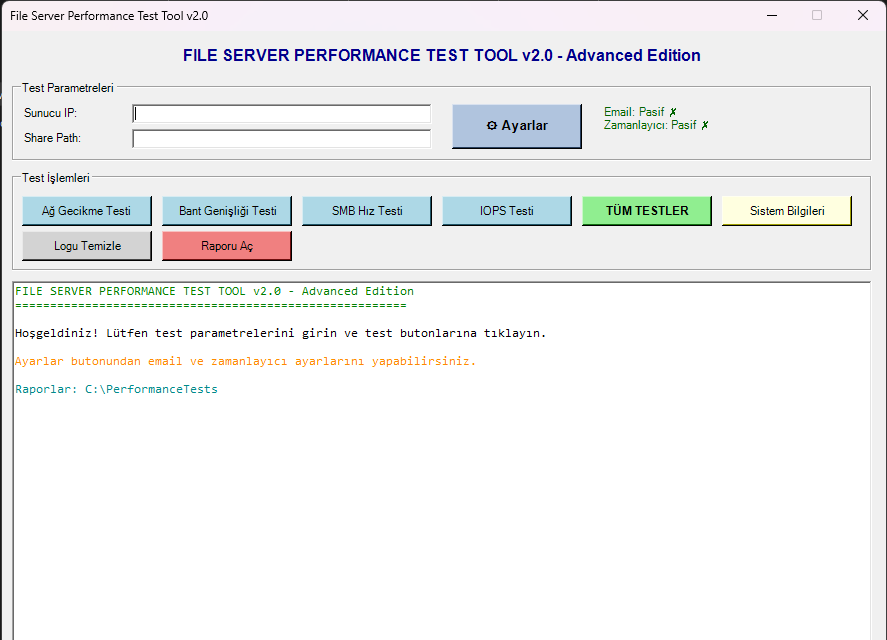
File Server Performance Test Tool v2.0 ile sunucunuzun performansını test edin
File Server Performance Test Tool v2.0 - Advanced Edition
Yeni Özellikler
⚙️ Ayarlar Sayfası
- Test parametrelerini kaydetme (Sunucu IP, Share Path)
- Ayarlar JSON dosyasında saklanır: `C:\PerformanceTests\config.json`
📧 Email Gönderimi
- Test sonuçlarını otomatik email ile gönderme
- SMTP ayarları:
- SMTP Server ve Port
- Kullanıcı adı ve şifre
- Gönderen ve alıcı email adresleri
- SSL desteği
⏰ Otomatik Görev Zamanlayıcı
- Testleri belirli aralıklarla otomatik çalıştırma
- Windows Task Scheduler entegrasyonu
- 5-1440 dakika arası ayarlanabilir interval
- Otomatik çalışan testler email ile raporlanır
📊 Gelişmiş Log Sistemi
- Her test için ayrı log dosyası
- UTF-8 BOM encoding (Türkçe karakter desteği)
- Dosya adı formatı: `YYYYMMDD_HHMMSS_TestAdi.txt`
Kullanım
Manuel Çalıştırma
```powershell
PowerShell'i Administrator olarak açın
.\FileServerTest-GUI-Advanced.ps1
```
Otomatik Çalıştırma (Zamanlayıcı için)
```powershell
.\FileServerTest-GUI-Advanced.ps1 -AutoRun
```
Ayarlar
Test Parametreleri
- **Sunucu IP**: Ping testi için hedef IP veya hostname
- **Share Path**: SMB, Bandwidth ve IOPS testleri için UNC path (örn: `\\192.168.1.100\share`)
Email Ayarları
- **Email Gönderimi Aktif**: Email gönderimini etkinleştir/devre dışı bırak
- **SMTP Server**: SMTP sunucu adresi (örn: `smtp.gmail.com`)
- **Port**: SMTP port (genellikle 587 veya 465)
- **Kullanıcı Adı**: SMTP kimlik doğrulama kullanıcı adı
- **Şifre**: SMTP kimlik doğrulama şifresi
- **Gönderen Email**: Gönderen email adresi
- **Alıcı Email**: Alıcı email adresi (virgülle ayırarak birden fazla eklenebilir)
- **SSL Kullan**: SSL/TLS şifreleme kullan
Gmail için Örnek Ayarlar
```
SMTP Server: smtp.gmail.com
Port: 587
SSL: Aktif
Kullanıcı Adı: your-email@gmail.com
Şifre: uygulama-sifresi (2FA aktifse App Password kullanın)
```
Office 365 için Örnek Ayarlar
```
SMTP Server: smtp.office365.com
Port: 587
SSL: Aktif
Kullanıcı Adı: your-email@company.com
Şifre: hesap-sifresi
```
Otomatik Görev Zamanlayıcı
- **Otomatik Test Aktif**: Zamanlayıcıyı etkinleştir/devre dışı bırak
- **Test Aralığı**: Testlerin çalışma sıklığı (dakika cinsinden)
- Minimum: 5 dakika
- Maksimum: 1440 dakika (24 saat)
- Önerilen: 60 dakika
Özellikler
Testler
1. **Ağ Gecikme Testi**: 100 ping paketi ile latency ölçümü
2. **Bant Genişliği Testi**: 100MB dosya kopyalama ile throughput ölçümü
3. **SMB Hız Testi**: Küçük, orta ve büyük dosyalarla SMB performans testi
4. **IOPS Testi**: Random read/write IOPS ölçümü
5. **Sistem Bilgileri**: CPU, RAM, Disk ve Network bilgileri
Raporlama
- Her test için ayrı log dosyası
- Renkli konsol çıktısı
- UTF-8 encoding ile Türkçe karakter desteği
- Otomatik email gönderimi
- Notepad ile rapor görüntüleme
Dosya Yapısı
```
C:\PerformanceTests\
├── config.json Ayarlar dosyası
├── 20260113_120530_AgGecikme.txt Ağ gecikme test raporu
├── 20260113_120645_BantGenisligi.txt Bant genişliği test raporu
├── 20260113_120820_SMBTest.txt SMB test raporu
├── 20260113_121015_IOPSTest.txt IOPS test raporu
├── 20260113_121200_SistemBilgileri.txt Sistem bilgileri raporu
└── 20260113_121500_TumTestler.txt Tüm testler raporu
```
Gereksinimler
- Windows Server 2019 veya üzeri
- PowerShell 5.1 veya üzeri
- Administrator yetkileri
- .NET Framework 4.5 veya üzeri
Sorun Giderme
Email Gönderilmiyor
- SMTP ayarlarını kontrol edin
- Firewall'da SMTP portunu açın
- Gmail kullanıyorsanız "Daha az güvenli uygulamalara izin ver" veya App Password kullanın
- Office 365 kullanıyorsanız SMTP Auth'un etkin olduğundan emin olun
Zamanlayıcı Çalışmıyor
- Script'i Administrator olarak çalıştırdığınızdan emin olun
- Task Scheduler'da "FileServerPerformanceTest" görevini kontrol edin
- Görev özelliklerinde "Run with highest privileges" seçeneğinin aktif olduğundan emin olun
Türkçe Karakterler Bozuk
- Log dosyalarını UTF-8 destekleyen bir editörle açın (Notepad++, VS Code)
- Windows Notepad kullanıyorsanız "Encoding" menüsünden "UTF-8" seçin
Lisans
Bu araç Önder Aköz tarafından Windows Server 2016/2019/2022 için geliştirilmiştir.
Versiyon Geçmişi
v2.0 (2026-01-13)
- Ayarlar sayfası eklendi
- Email gönderimi eklendi
- Otomatik görev zamanlayıcı eklendi
- JSON tabanlı konfigürasyon sistemi
- Her test için ayrı log dosyası
v1.0 (2026-01-13)
- İlk sürüm
- Temel test fonksiyonları
- GUI arayüzü
# File Server Performance Test Tool - Advanced GUI Version
# Windows Server 2019 compatible
# Run as Administrator

# Check for AutoRun parameter
param([switch]$AutoRun)

Add-Type -AssemblyName System.Windows.Forms
Add-Type -AssemblyName System.Drawing

# Global variables
$script:OutputPath = "C:\PerformanceTests"
$script:C $script:OutputPath "config.json"
$script:reportFile = ""
$script:isRunning = $false
$script:c

# Create output folder
if (-not (Test-Path $script:OutputPath)) {
    New-Item -ItemType Directory -Path $script:OutputPath -Force | Out-Null
}

#region Configuration Management
function Load-Config {
    if (Test-Path $script:ConfigFile) {
        try {
            $json = Get-Content -Path $script:ConfigFile -Raw -Encoding UTF8
            $script:c | ConvertFrom-Json
        } catch {
            $script:c
        }
    } else {
        $script:c
    }
}

function Get-DefaultConfig {
    return [PSCustomObject]@{
        ServerIP = ""
        SharePath = ""
        OutputPath = "C:\PerformanceTests"
        EmailEnabled = $false
        SMTPServer = ""
        SMTPPort = 587
        SMTPUsername = ""
        SMTPPassword = ""
        SMTPFrom = ""
        SMTPTo = ""
        SMTPUseSSL = $true
        ScheduleEnabled = $false
        ScheduleInterval = 60
        ScheduleTests = @("Network", "Bandwidth", "SMB", "IOPS")
    }
}

function Save-Config {
    try {
        $utf8BOM = New-Object System.Text.UTF8Encoding $true
        $json = $script:config | ConvertTo-Json -Depth 10
        [System.IO.File]::WriteAllText($script:ConfigFile, $json, $utf8BOM)
        return $true
    } catch {
        [System.Windows.Forms.MessageBox]::Show("Ayarlar kaydedilemedi: $($_.Exception.Message)", "Hata", [System.Windows.Forms.MessageBoxButtons]::OK, [System.Windows.Forms.MessageBoxIcon]::Error)
        return $false
    }
}
#endregion

#region Email Functions
function Send-EmailReport {
    param([string]$ReportFile)

    if (-not $script:config.EmailEnabled) {
        return
    }

    if ([string]::IsNullOrEmpty($script:config.SMTPServer) -or [string]::IsNullOrEmpty($script:config.SMTPTo)) {
        Write-Log "[WARN] Email ayarları eksik, email gönderilemedi!" "Yellow"
        return
    }

    try {
        Write-Log "Email gönderiliyor..." "Yellow"

        $reportC -Path $ReportFile -Raw -Encoding UTF8

        $mailParams = @{
            SmtpServer = $script:config.SMTPServer
            Port = $script:config.SMTPPort
            From = $script:config.SMTPFrom
            To = $script:config.SMTPTo
            Subject = "File Server Test Raporu - $(Get-Date -Format 'dd.MM.yyyy HH:mm')"
            Body = $reportContent
            Encoding = [System.Text.Encoding]::UTF8
            UseSsl = $script:config.SMTPUseSSL
        }

        if (-not [string]::IsNullOrEmpty($script:config.SMTPUsername)) {
            $securePassword = ConvertTo-SecureString $script:config.SMTPPassword -AsPlainText -Force
            $credential = New-Object System.Management.Automation.PSCredential($script:config.SMTPUsername, $securePassword)
            $mailParams.Credential = $credential
        }

        Send-MailMessage @mailParams
        Write-Log "[OK] Email başarıyla gönderildi!" "Green"

    } catch {
        Write-Log "[ERROR] Email gönderilemedi: $($_.Exception.Message)" "Red"
    }
}
#endregion

#region Scheduler Functions
function Register-ScheduledTask {
    param([int]$IntervalMinutes)

    try {
        $taskName = "FileServerPerformanceTest"
        $scriptPath = $PSCommandPath

        # Mevcut görevi sil
        Unregister-ScheduledTask -TaskName $taskName -Confirm:$false -ErrorAction SilentlyContinue

        # Yeni görev oluştur
        $action = New-ScheduledTaskAction -Execute "PowerShell.exe" -Argument "-NoProfile -ExecutionPolicy Bypass -File `"$scriptPath`" -AutoRun"
        $trigger = New-ScheduledTaskTrigger -Once -At (Get-Date) -RepetitionInterval (New-TimeSpan -Minutes $IntervalMinutes) -RepetitionDuration ([TimeSpan]::MaxValue)
        $principal = New-ScheduledTaskPrincipal -UserId "$env:USERDOMAIN\$env:USERNAME" -LogonType Interactive -RunLevel Highest
        $settings = New-ScheduledTaskSettingsSet -AllowStartIfOnBatteries -DontStopIfGoingOnBatteries -StartWhenAvailable

        Register-ScheduledTask -TaskName $taskName -Action $action -Trigger $trigger -Principal $principal -Settings $settings -Force | Out-Null

        Write-Log "[OK] Zamanlanmış görev oluşturuldu (Her $IntervalMinutes dakikada)" "Green"
        return $true

    } catch {
        Write-Log "[ERROR] Zamanlanmış görev oluşturulamadı: $($_.Exception.Message)" "Red"
        return $false
    }
}

function Unregister-ScheduledTask {
    try {
        $taskName = "FileServerPerformanceTest"
        Unregister-ScheduledTask -TaskName $taskName -Confirm:$false -ErrorAction SilentlyContinue
        Write-Log "[OK] Zamanlanmış görev kaldırıldı" "Green"
        return $true
    } catch {
        Write-Log "[ERROR] Zamanlanmış görev kaldırılamadı: $($_.Exception.Message)" "Red"
        return $false
    }
}
#endregion

#region Helper Functions
function Write-Log {
    param([string]$Message, [string]$Color = "Black", [string]$TestName = "")

    # GUI kontrolü - eğer form yoksa sadece console'a yaz
    if ($null -eq $textBox) {
        Write-Host $Message
        return
    }

    $textBox.Selecti
    $textBox.Selecti

    switch ($Color) {
        "Green" { $textBox.Selecti }
        "Red" { $textBox.Selecti }
        "Yellow" { $textBox.Selecti }
        "Cyan" { $textBox.Selecti }
        default { $textBox.Selecti }
    }

    $textBox.AppendText("$Message`r`n")
    $textBox.ScrollToCaret()
    $form.Refresh()

    # Her test için ayrı dosya oluştur
    if (-not [string]::IsNullOrEmpty($TestName)) {
        $timestamp = Get-Date -Format "yyyyMMdd_HHmmss"
        $script:reportFile = Join-Path $script:OutputPath "${timestamp}_${TestName}.txt"

        # UTF-8 BOM ile dosya oluştur
        $utf8BOM = New-Object System.Text.UTF8Encoding $true
        $header = "Test: $TestName`r`nTarih: $(Get-Date)`r`nSunucu: $env:COMPUTERNAME`r`n================================================================`r`n`r`n"
        [System.IO.File]::WriteAllText($script:reportFile, $header, $utf8BOM)
    }

    if ($script:reportFile -and (Test-Path $script:reportFile)) {
        # UTF-8 BOM ile append
        $utf8BOM = New-Object System.Text.UTF8Encoding $true
        $currentC $utf8BOM)
        $newC + $Message + "`r`n"
        [System.IO.File]::WriteAllText($script:reportFile, $newContent, $utf8BOM)
    }
}

function Enable-Controls {
    $btnNetworkTest.Enabled = $true
    $btnBandwidthTest.Enabled = $true
    $btnSMBTest.Enabled = $true
    $btnIOPSTest.Enabled = $true
    $btnFullTest.Enabled = $true
    $btnSystemInfo.Enabled = $true
    $btnClearLog.Enabled = $true
    $btnSaveReport.Enabled = $true
    $btnSettings.Enabled = $true
    $script:isRunning = $false
}

function Disable-Controls {
    $btnNetworkTest.Enabled = $false
    $btnBandwidthTest.Enabled = $false
    $btnSMBTest.Enabled = $false
    $btnIOPSTest.Enabled = $false
    $btnFullTest.Enabled = $false
    $btnSystemInfo.Enabled = $false
    $btnClearLog.Enabled = $false
    $btnSaveReport.Enabled = $false
    $btnSettings.Enabled = $false
    $script:isRunning = $true
}
#endregion

#region Test Functions
function Test-NetworkLatency {
    $target = if ([string]::IsNullOrEmpty($txtServerIP.Text)) { $script:config.ServerIP } else { $txtServerIP.Text.Trim() }

    if ([string]::IsNullOrEmpty($target)) {
        [System.Windows.Forms.MessageBox]::Show("Lütfen Sunucu IP adresi giriniz!", "Uyarı", [System.Windows.Forms.MessageBoxButtons]::OK, [System.Windows.Forms.MessageBoxIcon]::Warning)
        return
    }

    # IP adresi veya hostname validasyonu
    $ipPattern = "^(?:(?:25[0-5]|2[0-4][0-9]|[01]?[0-9][0-9]?)\.){3}(?:25[0-5]|2[0-4][0-9]|[01]?[0-9][0-9]?)$"
    $hostnamePattern = "^[a-zA-Z0-9]([a-zA-Z0-9\-]{0,61}[a-zA-Z0-9])?(\.[a-zA-Z0-9]([a-zA-Z0-9\-]{0,61}[a-zA-Z0-9])?)*$"

    if (-not ($target -match $ipPattern -or $target -match $hostnamePattern)) {
        [System.Windows.Forms.MessageBox]::Show("Geçersiz IP adresi veya hostname!`n`nÖrnekler:`n- 192.168.1.1`n- server.domain.com`n- fileserver", "Hata", [System.Windows.Forms.MessageBoxButtons]::OK, [System.Windows.Forms.MessageBoxIcon]::Error)
        return
    }

    Write-Log "" "" "AgGecikme"
    Write-Log "`n================================================================" "Cyan"
    Write-Log "1. AĞ GECİKME TESTİ (Network Latency)" "Cyan"
    Write-Log "================================================================" "Cyan"
    Write-Log "Ping testi yapılıyor ($target)..." "Yellow"

    $pingResults = Test-Connection -ComputerName $target -Count 100 -ErrorAction SilentlyContinue

    if ($pingResults) {
        $avgLatency = ($pingResults | Measure-Object -Property ResponseTime -Average).Average
        $minLatency = ($pingResults | Measure-Object -Property ResponseTime -Minimum).Minimum
        $maxLatency = ($pingResults | Measure-Object -Property ResponseTime -Maximum).Maximum
        $successCount = ($pingResults | Where-Object {$_.StatusCode -eq 0}).Count
        $lossPercent = ((100 - $successCount) / 100) * 100

        Write-Log "`nPING SONUÇLARI:"
        Write-Log "--------------"
        Write-Log "Hedef: $target"
        Write-Log "Paket Gönderilen: 100"
        Write-Log "Başarılı: $successCount"
        Write-Log "Kayıp: $lossPercent%"
        Write-Log "Ortalama Gecikme: $([math]::Round($avgLatency, 2)) ms"
        Write-Log "Minimum Gecikme: $minLatency ms"
        Write-Log "Maksimum Gecikme: $maxLatency ms"
        Write-Log "`nDEĞERLENDİRME:"

        if ($avgLatency -lt 20) {
            Write-Log "[OK] MÜKEMMEL: Gecikme çok düşük (<20ms)" "Green"
        } elseif ($avgLatency -lt 50) {
            Write-Log "[OK] İYİ: Gecikme kabul edilebilir seviyede (<50ms)" "Green"
        } elseif ($avgLatency -lt 100) {
            Write-Log "[WARN] ORTA: Gecikme biraz yüksek (50-100ms)" "Yellow"
        } else {
            Write-Log "[ERROR] KÖTÜ: Yüksek gecikme tespit edildi (>100ms)" "Red"
        }

        if ($lossPercent -gt 1) {
            Write-Log "[ERROR] UYARI: Paket kaybı tespit edildi! (%$lossPercent)" "Red"
        }

    } else {
        Write-Log "[ERROR] Ping testi başarısız! Hedef sunucuya erişilemiyor." "Red"
    }
}

function Test-Bandwidth {
    $target = if ([string]::IsNullOrEmpty($txtSharePath.Text)) { $script:config.SharePath } else { $txtSharePath.Text.Trim() }

    if ([string]::IsNullOrEmpty($target)) {
        [System.Windows.Forms.MessageBox]::Show("Lütfen Share Path giriniz!`n`nÖrnek: \\192.168.1.100\share", "Uyarı", [System.Windows.Forms.MessageBoxButtons]::OK, [System.Windows.Forms.MessageBoxIcon]::Warning)
        return
    }

    if (-not $target.StartsWith("\\")) {
        [System.Windows.Forms.MessageBox]::Show("Share Path UNC formatında olmalıdır!`n`nÖrnek: \\192.168.1.100\share", "Hata", [System.Windows.Forms.MessageBoxButtons]::OK, [System.Windows.Forms.MessageBoxIcon]::Error)
        return
    }

    Write-Log "" "" "BantGenisligi"
    Write-Log "`n================================================================" "Cyan"
    Write-Log "2. BANT GENİŞLİĞİ TESTİ (Bandwidth)" "Cyan"
    Write-Log "================================================================" "Cyan"

    $testFile = Join-Path $script:OutputPath "bandwidth_test_100MB.tmp"
    $testSize = 100MB

    Write-Log "Test dosyası oluşturuluyor (100MB)..." "Yellow"
    $random = New-Object byte[] $testSize
    (New-Object Random).NextBytes($random)
    [System.IO.File]::WriteAllBytes($testFile, $random)

    Write-Log "Dosya kopyalama testi başlatılıyor..." "Yellow"

    $startTime = Get-Date
    try {
        $destFile = Join-Path $target "bandwidth_test_100MB.tmp"
        Copy-Item -Path $testFile -Destination $destFile -Force
        $endTime = Get-Date
        $duration = ($endTime - $startTime).TotalSeconds
        $speedMBps = ($testSize / 1MB) / $duration
        $speedMbps = $speedMBps * 8

        Write-Log "`nBANT GENİŞLİĞİ TEST SONUÇLARI:"
        Write-Log "-----------------------------"
        Write-Log "Test Dosya Boyutu: 100 MB"
        Write-Log "Süre: $([math]::Round($duration, 2)) saniye"
        Write-Log "Ortalama Hız: $([math]::Round($speedMBps, 2)) MB/s ($([math]::Round($speedMbps, 2)) Mbps)"
        Write-Log "`nDEĞERLENDİRME:"

        if ($speedMbps -gt 800) {
            Write-Log "[OK] MÜKEMMEL: Gigabit hıza yakın performans" "Green"
        } elseif ($speedMbps -gt 400) {
            Write-Log "[OK] İYİ: MPLS 500Mbps hattı verimli kullanılıyor" "Green"
        } elseif ($speedMbps -gt 80) {
            Write-Log "[WARN] ORTA: MPLS 100Mbps hattı kullanılıyor" "Yellow"
        } else {
            Write-Log "[ERROR] DÜŞÜK: Bant genişliği beklenenin altında" "Red"
        }

        Remove-Item -Path $destFile -Force -ErrorAction SilentlyContinue

    } catch {
        Write-Log "[ERROR] Kopyalama hatası: $($_.Exception.Message)" "Red"
    }

    Remove-Item -Path $testFile -Force -ErrorAction SilentlyContinue
}

function Test-SMBPerformance {
    $sharePath = if ([string]::IsNullOrEmpty($txtSharePath.Text)) { $script:config.SharePath } else { $txtSharePath.Text.Trim() }

    if ([string]::IsNullOrEmpty($sharePath)) {
        [System.Windows.Forms.MessageBox]::Show("Lütfen Share Path giriniz!", "Uyarı", [System.Windows.Forms.MessageBoxButtons]::OK, [System.Windows.Forms.MessageBoxIcon]::Warning)
        return
    }

    Write-Log "" "" "SMBTest"
    Write-Log "`n================================================================" "Cyan"
    Write-Log "3. SMB BAĞLANTI HIZ TESTİ" "Cyan"
    Write-Log "================================================================" "Cyan"

    $testFolder = Join-Path $script:OutputPath "SMBTest"
    if (-not (Test-Path $testFolder)) {
        New-Item -ItemType Directory -Path $testFolder -Force | Out-Null
    }

    $testSizes = @{
        "Small" = 1MB
        "Medium" = 10MB
        "Large" = 50MB
    }

    $results = @{}

    foreach ($sizeType in $testSizes.Keys) {
        $size = $testSizes[$sizeType]
        $count = if ($sizeType -eq "Small") { 100 } elseif ($sizeType -eq "Medium") { 10 } else { 5 }

        Write-Log "`n$sizeType dosyalar test ediliyor ($count adet x $($size/1MB)MB)..." "Yellow"

        $files = @()
        for ($i = 1; $i -le $count; $i++) {
            $fileName = "test_${sizeType}_$i.tmp"
            $filePath = Join-Path $testFolder $fileName
            $random = New-Object byte[] $size
            (New-Object Random).NextBytes($random)
            [System.IO.File]::WriteAllBytes($filePath, $random)
            $files += $filePath
        }

        $startTime = Get-Date
        try {
            foreach ($file in $files) {
                Copy-Item -Path $file -Destination $sharePath -Force
            }
            $endTime = Get-Date
            $duration = ($endTime - $startTime).TotalSeconds
            $totalSizeMB = ($size * $count) / 1MB
            $speedMBps = $totalSizeMB / $duration

            $results[$sizeType] = @{
                Count = $count
                TotalSize = $totalSizeMB
                Duration = $duration
                Speed = $speedMBps
            }

            Write-Log "  [OK] Tamamlandı: $([math]::Round($speedMBps, 2)) MB/s" "Green"

            foreach ($file in $files) {
                $fileName = Split-Path $file -Leaf
                Remove-Item -Path "$sharePath\$fileName" -Force -ErrorAction SilentlyContinue
            }

        } catch {
            Write-Log "  [ERROR] Hata: $($_.Exception.Message)" "Red"
        }

        foreach ($file in $files) {
            Remove-Item -Path $file -Force -ErrorAction SilentlyContinue
        }
    }

    Write-Log "`n`nSMB PERFORMANS TEST SONUÇLARI:"
    Write-Log "-----------------------------"
    Write-Log "Share Path: $sharePath`n"

    foreach ($sizeType in $results.Keys) {
        $r = $results[$sizeType]
        Write-Log "$sizeType Dosyalar:"
        Write-Log "  Dosya Sayısı: $($r.Count) adet"
        Write-Log "  Toplam Boyut: $([math]::Round($r.TotalSize, 2)) MB"
        Write-Log "  Süre: $([math]::Round($r.Duration, 2)) saniye"
        Write-Log "  Ortalama Hız: $([math]::Round($r.Speed, 2)) MB/s`n"
    }

    if ($results.Count -gt 0) {
        Write-Log "DEĞERLENDİRME:"

        # Speed değerlerini topla
        $speedValues = @()
        foreach ($key in $results.Keys) {
            if ($results[$key].Speed) {
                $speedValues += $results[$key].Speed
            }
        }

        if ($speedValues.Count -gt 0) {
            $avgSpeed = ($speedValues | Measure-Object -Average).Average
            if ($avgSpeed -gt 50) {
                Write-Log "[OK] MÜKEMMEL: SMB performansı çok iyi" "Green"
            } elseif ($avgSpeed -gt 20) {
                Write-Log "[OK] İYİ: SMB performansı kabul edilebilir" "Green"
            } else {
                Write-Log "[ERROR] DÜŞÜK: SMB performansı optimize edilmeli" "Red"
            }
        } else {
            Write-Log "[ERROR] Test tamamlanamadı - Speed değerleri alınamadı!" "Red"
        }
    } else {
        Write-Log "[ERROR] Test tamamlanamadı!" "Red"
    }

    Remove-Item -Path $testFolder -Recurse -Force -ErrorAction SilentlyContinue
}

function Test-IOPS {
    $testPath = if ([string]::IsNullOrEmpty($txtSharePath.Text)) { $script:config.SharePath } else { $txtSharePath.Text.Trim() }

    if ([string]::IsNullOrEmpty($testPath)) {
        [System.Windows.Forms.MessageBox]::Show("Lütfen Test Path giriniz!", "Uyarı", [System.Windows.Forms.MessageBoxButtons]::OK, [System.Windows.Forms.MessageBoxIcon]::Warning)
        return
    }

    Write-Log "" "" "IOPSTest"
    Write-Log "`n================================================================" "Cyan"
    Write-Log "4. IOPS (Disk Performans) TESTİ" "Cyan"
    Write-Log "================================================================" "Cyan"
    Write-Log "IOPS testi yapılıyor... Bu test birkaç dakika sürebilir..." "Yellow"

    $testFolder = Join-Path $testPath "IOPSTest"
    if (-not (Test-Path $testFolder)) {
        New-Item -ItemType Directory -Path $testFolder -Force | Out-Null
    }

    $testFile = Join-Path $testFolder "iops_test.tmp"
    $fileSize = 100MB
    $blockSize = 4KB

    Write-Log "Test dosyası oluşturuluyor..." "Yellow"
    $random = New-Object byte[] $fileSize
    (New-Object Random).NextBytes($random)
    [System.IO.File]::WriteAllBytes($testFile, $random)

    Write-Log "Random Read testi..." "Yellow"
    $readOps = 0
    $startTime = Get-Date
    $duration = 10
    $fileStream = [System.IO.File]::OpenRead($testFile)
    $buffer = New-Object byte[] $blockSize

    while (((Get-Date) - $startTime).TotalSeconds -lt $duration) {
        $pos = Get-Random -Minimum 0 -Maximum ($fileSize - $blockSize)
        $fileStream.Seek($pos, [System.IO.SeekOrigin]::Begin) | Out-Null
        $fileStream.Read($buffer, 0, $blockSize) | Out-Null
        $readOps++
    }

    $fileStream.Close()
    $readIOPS = [math]::Round($readOps / $duration, 0)

    Write-Log "Random Write testi..." "Yellow"
    $writeOps = 0
    $startTime = Get-Date
    $fileStream = [System.IO.File]::OpenWrite($testFile)
    $buffer = New-Object byte[] $blockSize

    while (((Get-Date) - $startTime).TotalSeconds -lt $duration) {
        $pos = Get-Random -Minimum 0 -Maximum ($fileSize - $blockSize)
        $fileStream.Seek($pos, [System.IO.SeekOrigin]::Begin) | Out-Null
        (New-Object Random).NextBytes($buffer)
        $fileStream.Write($buffer, 0, $blockSize)
        $writeOps++
    }

    $fileStream.Close()
    $writeIOPS = [math]::Round($writeOps / $duration, 0)

    Write-Log "`nIOPS TEST SONUÇLARI:"
    Write-Log "-------------------"
    Write-Log "Test Path: $testPath"
    Write-Log "Block Size: 4KB"
    Write-Log "Test Süresi: $duration saniye"
    Write-Log "Random Read IOPS: $readIOPS"
    Write-Log "Random Write IOPS: $writeIOPS"
    Write-Log "`nDEĞERLENDİRME:"

    if ($readIOPS -gt 10000) {
        Write-Log "[OK] MÜKEMMEL: NVMe SSD performansı" "Green"
    } elseif ($readIOPS -gt 3000) {
        Write-Log "[OK] İYİ: SSD performansı" "Green"
    } elseif ($readIOPS -gt 500) {
        Write-Log "[WARN] ORTA: SATA SSD veya yüksek performanslı HDD" "Yellow"
    } else {
        Write-Log "[ERROR] DÜŞÜK: Geleneksel HDD performansı - SSD'ye geçiş önerilir" "Red"
    }

    if ($writeIOPS -lt 100 -and $testPath.StartsWith("\\")) {
        Write-Log "[WARN] UYARI: Network storage üzerinde düşük write IOPS" "Yellow"
    }

    Remove-Item -Path $testFolder -Recurse -Force -ErrorAction SilentlyContinue
}

function Get-SystemInfo {
    Write-Log "" "" "SistemBilgileri"
    Write-Log "`n================================================================" "Cyan"
    Write-Log "SİSTEM BİLGİLERİ" "Cyan"
    Write-Log "================================================================" "Cyan"

    $cpu = Get-WmiObject Win32_Processor | Select-Object -First 1
    $ram = Get-WmiObject Win32_ComputerSystem
    $disk = Get-WmiObject Win32_LogicalDisk -Filter "DeviceID='C:'"
    $network = Get-NetAdapter | Where-Object {$_.Status -eq "Up"}

    Write-Log "`nSunucu: $env:COMPUTERNAME" "Cyan"
    Write-Log "İşletim Sistemi: $((Get-WmiObject Win32_OperatingSystem).Caption)" "Cyan"
    Write-Log "Processor: $($cpu.Name)" "Cyan"
    Write-Log "CPU Çekirdek: $($cpu.NumberOfCores)" "Cyan"
    Write-Log "RAM: $([math]::Round($ram.TotalPhysicalMemory/1GB, 2)) GB" "Cyan"
    Write-Log "C: Disk Boş Alan: $([math]::Round($disk.FreeSpace/1GB, 2)) GB / $([math]::Round($disk.Size/1GB, 2)) GB" "Cyan"
    Write-Log "`nAktif Network Adaptörleri:" "Cyan"

    foreach ($adapter in $network) {
        Write-Log "  - $($adapter.Name): $($adapter.LinkSpeed)" "Cyan"
    }
}
#endregion

#region Settings Form
function Show-SettingsForm {
    $settingsForm = New-Object System.Windows.Forms.Form
    $settingsForm.Text = "Ayarlar"
    $settingsForm.Size = New-Object System.Drawing.Size(600, 650)
    $settingsForm.StartPosition = "CenterParent"
    $settingsForm.FormBorder
    $settingsForm.MaximizeBox = $false
    $settingsForm.MinimizeBox = $false

    $yPos = 20

    # Test Parametreleri
    $grpTest = New-Object System.Windows.Forms.GroupBox
    $grpTest.Location = New-Object System.Drawing.Point(10, $yPos)
    $grpTest.Size = New-Object System.Drawing.Size(560, 100)
    $grpTest.Text = "Test Parametreleri"
    $settingsForm.Controls.Add($grpTest)

    $lblServerIP = New-Object System.Windows.Forms.Label
    $lblServerIP.Location = New-Object System.Drawing.Point(10, 25)
    $lblServerIP.Size = New-Object System.Drawing.Size(120, 20)
    $lblServerIP.Text = "Sunucu IP:"
    $grpTest.Controls.Add($lblServerIP)

    $txtSettingsServerIP = New-Object System.Windows.Forms.TextBox
    $txtSettingsServerIP.Location = New-Object System.Drawing.Point(140, 23)
    $txtSettingsServerIP.Size = New-Object System.Drawing.Size(400, 20)
    $txtSettingsServerIP.Text = $script:config.ServerIP
    $grpTest.Controls.Add($txtSettingsServerIP)

    $lblSharePath = New-Object System.Windows.Forms.Label
    $lblSharePath.Location = New-Object System.Drawing.Point(10, 55)
    $lblSharePath.Size = New-Object System.Drawing.Size(120, 20)
    $lblSharePath.Text = "Share Path:"
    $grpTest.Controls.Add($lblSharePath)

    $txtSettingsSharePath = New-Object System.Windows.Forms.TextBox
    $txtSettingsSharePath.Location = New-Object System.Drawing.Point(140, 53)
    $txtSettingsSharePath.Size = New-Object System.Drawing.Size(400, 20)
    $txtSettingsSharePath.Text = $script:config.SharePath
    $grpTest.Controls.Add($txtSettingsSharePath)

    $yPos += 120

    # Email Ayarları
    $grpEmail = New-Object System.Windows.Forms.GroupBox
    $grpEmail.Location = New-Object System.Drawing.Point(10, $yPos)
    $grpEmail.Size = New-Object System.Drawing.Size(560, 240)
    $grpEmail.Text = "Email Ayarları"
    $settingsForm.Controls.Add($grpEmail)

    $chkEmailEnabled = New-Object System.Windows.Forms.CheckBox
    $chkEmailEnabled.Location = New-Object System.Drawing.Point(10, 25)
    $chkEmailEnabled.Size = New-Object System.Drawing.Size(200, 20)
    $chkEmailEnabled.Text = "Email Gönderimi Aktif"
    $chkEmailEnabled.Checked = $script:config.EmailEnabled
    $grpEmail.Controls.Add($chkEmailEnabled)

    $lblSMTPServer = New-Object System.Windows.Forms.Label
    $lblSMTPServer.Location = New-Object System.Drawing.Point(10, 55)
    $lblSMTPServer.Size = New-Object System.Drawing.Size(120, 20)
    $lblSMTPServer.Text = "SMTP Server:"
    $grpEmail.Controls.Add($lblSMTPServer)

    $txtSMTPServer = New-Object System.Windows.Forms.TextBox
    $txtSMTPServer.Location = New-Object System.Drawing.Point(140, 53)
    $txtSMTPServer.Size = New-Object System.Drawing.Size(300, 20)
    $txtSMTPServer.Text = $script:config.SMTPServer
    $grpEmail.Controls.Add($txtSMTPServer)

    $lblSMTPPort = New-Object System.Windows.Forms.Label
    $lblSMTPPort.Location = New-Object System.Drawing.Point(450, 55)
    $lblSMTPPort.Size = New-Object System.Drawing.Size(40, 20)
    $lblSMTPPort.Text = "Port:"
    $grpEmail.Controls.Add($lblSMTPPort)

    $txtSMTPPort = New-Object System.Windows.Forms.TextBox
    $txtSMTPPort.Location = New-Object System.Drawing.Point(490, 53)
    $txtSMTPPort.Size = New-Object System.Drawing.Size(50, 20)
    $txtSMTPPort.Text = $script:config.SMTPPort
    $grpEmail.Controls.Add($txtSMTPPort)

    $lblSMTPUsername = New-Object System.Windows.Forms.Label
    $lblSMTPUsername.Location = New-Object System.Drawing.Point(10, 85)
    $lblSMTPUsername.Size = New-Object System.Drawing.Size(120, 20)
    $lblSMTPUsername.Text = "Kullanıcı Adı:"
    $grpEmail.Controls.Add($lblSMTPUsername)

    $txtSMTPUsername = New-Object System.Windows.Forms.TextBox
    $txtSMTPUsername.Location = New-Object System.Drawing.Point(140, 83)
    $txtSMTPUsername.Size = New-Object System.Drawing.Size(400, 20)
    $txtSMTPUsername.Text = $script:config.SMTPUsername
    $grpEmail.Controls.Add($txtSMTPUsername)

    $lblSMTPPassword = New-Object System.Windows.Forms.Label
    $lblSMTPPassword.Location = New-Object System.Drawing.Point(10, 115)
    $lblSMTPPassword.Size = New-Object System.Drawing.Size(120, 20)
    $lblSMTPPassword.Text = "Şifre:"
    $grpEmail.Controls.Add($lblSMTPPassword)

    $txtSMTPPassword = New-Object System.Windows.Forms.TextBox
    $txtSMTPPassword.Location = New-Object System.Drawing.Point(140, 113)
    $txtSMTPPassword.Size = New-Object System.Drawing.Size(400, 20)
    $txtSMTPPassword.Text = $script:config.SMTPPassword
    $txtSMTPPassword.PasswordChar = '*'
    $grpEmail.Controls.Add($txtSMTPPassword)

    $lblSMTPFrom = New-Object System.Windows.Forms.Label
    $lblSMTPFrom.Location = New-Object System.Drawing.Point(10, 145)
    $lblSMTPFrom.Size = New-Object System.Drawing.Size(120, 20)
    $lblSMTPFrom.Text = "Gönderen Email:"
    $grpEmail.Controls.Add($lblSMTPFrom)

    $txtSMTPFrom = New-Object System.Windows.Forms.TextBox
    $txtSMTPFrom.Location = New-Object System.Drawing.Point(140, 143)
    $txtSMTPFrom.Size = New-Object System.Drawing.Size(400, 20)
    $txtSMTPFrom.Text = $script:config.SMTPFrom
    $grpEmail.Controls.Add($txtSMTPFrom)

    $lblSMTPTo = New-Object System.Windows.Forms.Label
    $lblSMTPTo.Location = New-Object System.Drawing.Point(10, 175)
    $lblSMTPTo.Size = New-Object System.Drawing.Size(120, 20)
    $lblSMTPTo.Text = "Alıcı Email:"
    $grpEmail.Controls.Add($lblSMTPTo)

    $txtSMTPTo = New-Object System.Windows.Forms.TextBox
    $txtSMTPTo.Location = New-Object System.Drawing.Point(140, 173)
    $txtSMTPTo.Size = New-Object System.Drawing.Size(400, 20)
    $txtSMTPTo.Text = $script:config.SMTPTo
    $grpEmail.Controls.Add($txtSMTPTo)

    $chkSMTPUseSSL = New-Object System.Windows.Forms.CheckBox
    $chkSMTPUseSSL.Location = New-Object System.Drawing.Point(10, 205)
    $chkSMTPUseSSL.Size = New-Object System.Drawing.Size(200, 20)
    $chkSMTPUseSSL.Text = "SSL Kullan"
    $chkSMTPUseSSL.Checked = $script:config.SMTPUseSSL
    $grpEmail.Controls.Add($chkSMTPUseSSL)

    $yPos += 260

    # Zamanlayıcı Ayarları
    $grpSchedule = New-Object System.Windows.Forms.GroupBox
    $grpSchedule.Location = New-Object System.Drawing.Point(10, $yPos)
    $grpSchedule.Size = New-Object System.Drawing.Size(560, 100)
    $grpSchedule.Text = "Otomatik Görev Zamanlayıcı"
    $settingsForm.Controls.Add($grpSchedule)

    $chkScheduleEnabled = New-Object System.Windows.Forms.CheckBox
    $chkScheduleEnabled.Location = New-Object System.Drawing.Point(10, 25)
    $chkScheduleEnabled.Size = New-Object System.Drawing.Size(200, 20)
    $chkScheduleEnabled.Text = "Otomatik Test Aktif"
    $chkScheduleEnabled.Checked = $script:config.ScheduleEnabled
    $grpSchedule.Controls.Add($chkScheduleEnabled)

    $lblInterval = New-Object System.Windows.Forms.Label
    $lblInterval.Location = New-Object System.Drawing.Point(10, 55)
    $lblInterval.Size = New-Object System.Drawing.Size(120, 20)
    $lblInterval.Text = "Test Aralığı (dk):"
    $grpSchedule.Controls.Add($lblInterval)

    $txtInterval = New-Object System.Windows.Forms.NumericUpDown
    $txtInterval.Location = New-Object System.Drawing.Point(140, 53)
    $txtInterval.Size = New-Object System.Drawing.Size(100, 20)
    $txtInterval.Minimum = 5
    $txtInterval.Maximum = 1440
    $txtInterval.Value = $script:config.ScheduleInterval
    $grpSchedule.Controls.Add($txtInterval)

    $lblIntervalInfo = New-Object System.Windows.Forms.Label
    $lblIntervalInfo.Location = New-Object System.Drawing.Point(250, 55)
    $lblIntervalInfo.Size = New-Object System.Drawing.Size(290, 20)
    $lblIntervalInfo.Text = "(5-1440 dakika arası, önerilen: 60)"
    $lblIntervalInfo.ForeColor = [System.Drawing.Color]::Gray
    $grpSchedule.Controls.Add($lblIntervalInfo)

    $yPos += 120

    # Butonlar
    $btnSave = New-Object System.Windows.Forms.Button
    $btnSave.Location = New-Object System.Drawing.Point(350, $yPos)
    $btnSave.Size = New-Object System.Drawing.Size(100, 30)
    $btnSave.Text = "Kaydet"
    $btnSave.BackColor = [System.Drawing.Color]::LightGreen
    $btnSave.DialogResult = [System.Windows.Forms.DialogResult]::OK
    $settingsForm.Controls.Add($btnSave)

    $btnCancel = New-Object System.Windows.Forms.Button
    $btnCancel.Location = New-Object System.Drawing.Point(460, $yPos)
    $btnCancel.Size = New-Object System.Drawing.Size(100, 30)
    $btnCancel.Text = "İptal"
    $btnCancel.BackColor = [System.Drawing.Color]::LightCoral
    $btnCancel.DialogResult = [System.Windows.Forms.DialogResult]::Cancel
    $settingsForm.Controls.Add($btnCancel)

    $btnSave.Add_Click({
        # Ayarları kaydet
        $script:config.ServerIP = $txtSettingsServerIP.Text.Trim()
        $script:config.SharePath = $txtSettingsSharePath.Text.Trim()
        $script:config.EmailEnabled = $chkEmailEnabled.Checked
        $script:config.SMTPServer = $txtSMTPServer.Text.Trim()
        $script:config.SMTPPort = [int]$txtSMTPPort.Text
        $script:config.SMTPUsername = $txtSMTPUsername.Text.Trim()
        $script:config.SMTPPassword = $txtSMTPPassword.Text
        $script:config.SMTPFrom = $txtSMTPFrom.Text.Trim()
        $script:config.SMTPTo = $txtSMTPTo.Text.Trim()
        $script:config.SMTPUseSSL = $chkSMTPUseSSL.Checked

        $oldScheduleEnabled = $script:config.ScheduleEnabled
        $script:config.ScheduleEnabled = $chkScheduleEnabled.Checked
        $script:config.ScheduleInterval = [int]$txtInterval.Value

        if (Save-Config) {
            # Zamanlayıcı ayarlarını uygula
            if ($script:config.ScheduleEnabled -and -not $oldScheduleEnabled) {
                Register-ScheduledTask -IntervalMinutes $script:config.ScheduleInterval
            } elseif (-not $script:config.ScheduleEnabled -and $oldScheduleEnabled) {
                Unregister-ScheduledTask
            } elseif ($script:config.ScheduleEnabled) {
                Register-ScheduledTask -IntervalMinutes $script:config.ScheduleInterval
            }

            # Ana formdaki textbox'ları güncelle
            $txtServerIP.Text = $script:config.ServerIP
            $txtSharePath.Text = $script:config.SharePath

            [System.Windows.Forms.MessageBox]::Show("Ayarlar başarıyla kaydedildi!", "Bilgi", [System.Windows.Forms.MessageBoxButtons]::OK, [System.Windows.Forms.MessageBoxIcon]::Information)
        }
    })

    $settingsForm.AcceptButton = $btnSave
    $settingsForm.CancelButton = $btnCancel

    [void]$settingsForm.ShowDialog()
}
#endregion

#region Main GUI
# Load configuration
Load-Config

if ($AutoRun) {
    # Otomatik çalıştırma modu - GUI olmadan
    Write-Host "Otomatik test başlatılıyor..." -ForegroundColor Green

    $timestamp = Get-Date -Format "yyyyMMdd_HHmmss"
    $script:reportFile = Join-Path $script:OutputPath "${timestamp}_OtomatikTest.txt"

    $utf8BOM = New-Object System.Text.UTF8Encoding $true
    $header = "Test: OTOMATİK TEST`r`nTarih: $(Get-Date)`r`nSunucu: $env:COMPUTERNAME`r`n================================================================`r`n`r`n"
    [System.IO.File]::WriteAllText($script:reportFile, $header, $utf8BOM)

    # Testleri çalıştır
    if ($script:config.ScheduleTests -contains "Network") {
        Write-Host "Ağ Gecikme Testi..." -ForegroundColor Yellow
        Test-NetworkLatency
    }

    if ($script:config.ScheduleTests -contains "Bandwidth") {
        Write-Host "Bant Genişliği Testi..." -ForegroundColor Yellow
        Test-Bandwidth
    }

    if ($script:config.ScheduleTests -contains "SMB") {
        Write-Host "SMB Testi..." -ForegroundColor Yellow
        Test-SMBPerformance
    }

    if ($script:config.ScheduleTests -contains "IOPS") {
        Write-Host "IOPS Testi..." -ForegroundColor Yellow
        Test-IOPS
    }

    # Email gönder
    if ($script:config.EmailEnabled) {
        Send-EmailReport -ReportFile $script:reportFile
    }

    Write-Host "Otomatik test tamamlandı!" -ForegroundColor Green
    exit 0
}

# GUI Mode
$form = New-Object System.Windows.Forms.Form
$form.Text = "File Server Performance Test Tool v2.0"
$form.Size = New-Object System.Drawing.Size(900, 750)
$form.StartPosition = "CenterScreen"
$form.FormBorder
$form.MaximizeBox = $false

# Title Label
$lblTitle = New-Object System.Windows.Forms.Label
$lblTitle.Location = New-Object System.Drawing.Point(10, 10)
$lblTitle.Size = New-Object System.Drawing.Size(860, 30)
$lblTitle.Text = "FILE SERVER PERFORMANCE TEST TOOL v2.0 - Advanced Edition"
$lblTitle.F System.Drawing.Font("Arial", 12, [System.Drawing.FontStyle]::Bold)
$lblTitle.ForeColor = [System.Drawing.Color]::DarkBlue
$lblTitle.TextAlign = "MiddleCenter"
$form.Controls.Add($lblTitle)

# Input Group
$groupInput = New-Object System.Windows.Forms.GroupBox
$groupInput.Location = New-Object System.Drawing.Point(10, 50)
$groupInput.Size = New-Object System.Drawing.Size(860, 80)
$groupInput.Text = "Test Parametreleri"
$form.Controls.Add($groupInput)

# Server IP Label
$lblServerIP = New-Object System.Windows.Forms.Label
$lblServerIP.Location = New-Object System.Drawing.Point(10, 25)
$lblServerIP.Size = New-Object System.Drawing.Size(100, 20)
$lblServerIP.Text = "Sunucu IP:"
$groupInput.Controls.Add($lblServerIP)

# Server IP TextBox
$txtServerIP = New-Object System.Windows.Forms.TextBox
$txtServerIP.Location = New-Object System.Drawing.Point(120, 23)
$txtServerIP.Size = New-Object System.Drawing.Size(300, 20)
$txtServerIP.Text = $script:config.ServerIP
$groupInput.Controls.Add($txtServerIP)

# Share Path Label
$lblSharePath = New-Object System.Windows.Forms.Label
$lblSharePath.Location = New-Object System.Drawing.Point(10, 50)
$lblSharePath.Size = New-Object System.Drawing.Size(100, 20)
$lblSharePath.Text = "Share Path:"
$groupInput.Controls.Add($lblSharePath)

# Share Path TextBox
$txtSharePath = New-Object System.Windows.Forms.TextBox
$txtSharePath.Location = New-Object System.Drawing.Point(120, 48)
$txtSharePath.Size = New-Object System.Drawing.Size(300, 20)
$txtSharePath.Text = $script:config.SharePath
$groupInput.Controls.Add($txtSharePath)

# Settings Button
$btnSettings = New-Object System.Windows.Forms.Button
$btnSettings.Location = New-Object System.Drawing.Point(440, 23)
$btnSettings.Size = New-Object System.Drawing.Size(130, 45)
$btnSettings.Text = "⚙ Ayarlar"
$btnSettings.BackColor = [System.Drawing.Color]::LightSteelBlue
$btnSettings.F System.Drawing.Font("Arial", 10, [System.Drawing.FontStyle]::Bold)
$groupInput.Controls.Add($btnSettings)

# Status Label
$lblStatus = New-Object System.Windows.Forms.Label
$lblStatus.Location = New-Object System.Drawing.Point(590, 25)
$lblStatus.Size = New-Object System.Drawing.Size(250, 45)
$lblStatus.Text = "Email: " + $(if ($script:config.EmailEnabled) { "Aktif ✓" } else { "Pasif ✗" }) + "`nZamanlayıcı: " + $(if ($script:config.ScheduleEnabled) { "Aktif ✓" } else { "Pasif ✗" })
$lblStatus.ForeColor = [System.Drawing.Color]::DarkGreen
$groupInput.Controls.Add($lblStatus)

# Test Buttons Group
$groupTests = New-Object System.Windows.Forms.GroupBox
$groupTests.Location = New-Object System.Drawing.Point(10, 140)
$groupTests.Size = New-Object System.Drawing.Size(860, 100)
$groupTests.Text = "Test İşlemleri"
$form.Controls.Add($groupTests)

# Network Test Button
$btnNetworkTest = New-Object System.Windows.Forms.Button
$btnNetworkTest.Location = New-Object System.Drawing.Point(10, 25)
$btnNetworkTest.Size = New-Object System.Drawing.Size(130, 30)
$btnNetworkTest.Text = "Ağ Gecikme Testi"
$btnNetworkTest.BackColor = [System.Drawing.Color]::LightBlue
$groupTests.Controls.Add($btnNetworkTest)

# Bandwidth Test Button
$btnBandwidthTest = New-Object System.Windows.Forms.Button
$btnBandwidthTest.Location = New-Object System.Drawing.Point(150, 25)
$btnBandwidthTest.Size = New-Object System.Drawing.Size(130, 30)
$btnBandwidthTest.Text = "Bant Genişliği Testi"
$btnBandwidthTest.BackColor = [System.Drawing.Color]::LightBlue
$groupTests.Controls.Add($btnBandwidthTest)

# SMB Test Button
$btnSMBTest = New-Object System.Windows.Forms.Button
$btnSMBTest.Location = New-Object System.Drawing.Point(290, 25)
$btnSMBTest.Size = New-Object System.Drawing.Size(130, 30)
$btnSMBTest.Text = "SMB Hız Testi"
$btnSMBTest.BackColor = [System.Drawing.Color]::LightBlue
$groupTests.Controls.Add($btnSMBTest)

# IOPS Test Button
$btnIOPSTest = New-Object System.Windows.Forms.Button
$btnIOPSTest.Location = New-Object System.Drawing.Point(430, 25)
$btnIOPSTest.Size = New-Object System.Drawing.Size(130, 30)
$btnIOPSTest.Text = "IOPS Testi"
$btnIOPSTest.BackColor = [System.Drawing.Color]::LightBlue
$groupTests.Controls.Add($btnIOPSTest)

# Full Test Button
$btnFullTest = New-Object System.Windows.Forms.Button
$btnFullTest.Location = New-Object System.Drawing.Point(570, 25)
$btnFullTest.Size = New-Object System.Drawing.Size(130, 30)
$btnFullTest.Text = "TÜM TESTLER"
$btnFullTest.BackColor = [System.Drawing.Color]::LightGreen
$btnFullTest.F System.Drawing.Font("Arial", 9, [System.Drawing.FontStyle]::Bold)
$groupTests.Controls.Add($btnFullTest)

# System Info Button
$btnSystemInfo = New-Object System.Windows.Forms.Button
$btnSystemInfo.Location = New-Object System.Drawing.Point(710, 25)
$btnSystemInfo.Size = New-Object System.Drawing.Size(130, 30)
$btnSystemInfo.Text = "Sistem Bilgileri"
$btnSystemInfo.BackColor = [System.Drawing.Color]::LightYellow
$groupTests.Controls.Add($btnSystemInfo)

# Clear Log Button
$btnClearLog = New-Object System.Windows.Forms.Button
$btnClearLog.Location = New-Object System.Drawing.Point(10, 60)
$btnClearLog.Size = New-Object System.Drawing.Size(130, 30)
$btnClearLog.Text = "Logu Temizle"
$btnClearLog.BackColor = [System.Drawing.Color]::LightGray
$groupTests.Controls.Add($btnClearLog)

# Save Report Button
$btnSaveReport = New-Object System.Windows.Forms.Button
$btnSaveReport.Location = New-Object System.Drawing.Point(150, 60)
$btnSaveReport.Size = New-Object System.Drawing.Size(130, 30)
$btnSaveReport.Text = "Raporu Aç"
$btnSaveReport.BackColor = [System.Drawing.Color]::LightCoral
$groupTests.Controls.Add($btnSaveReport)

# Progress Bar
$progressBar = New-Object System.Windows.Forms.ProgressBar
$progressBar.Location = New-Object System.Drawing.Point(290, 65)
$progressBar.Size = New-Object System.Drawing.Size(550, 20)
$progressBar.
$progressBar.MarqueeAnimati
$progressBar.Visible = $false
$groupTests.Controls.Add($progressBar)

# Output TextBox
$textBox = New-Object System.Windows.Forms.RichTextBox
$textBox.Location = New-Object System.Drawing.Point(10, 250)
$textBox.Size = New-Object System.Drawing.Size(860, 440)
$textBox.Multiline = $true
$textBox.ScrollBars = "Vertical"
$textBox.F System.Drawing.Font("Consolas", 9)
$textBox.Read
$textBox.BackColor = [System.Drawing.Color]::White
$form.Controls.Add($textBox)

Write-Log "FILE SERVER PERFORMANCE TEST TOOL v2.0 - Advanced Edition" "Green"
Write-Log "========================================================`n" "Green"
Write-Log "Hoşgeldiniz! Lütfen test parametrelerini girin ve test butonlarına tıklayın.`n"
Write-Log "Ayarlar butonundan email ve zamanlayıcı ayarlarını yapabilirsiniz.`n" "Yellow"
Write-Log "Raporlar: $($script:OutputPath)`n" "Cyan"

#region Event Handlers
$btnSettings.Add_Click({
    Show-SettingsForm
    # Status label'ı güncelle
    $lblStatus.Text = "Email: " + $(if ($script:config.EmailEnabled) { "Aktif ✓" } else { "Pasif ✗" }) + "`nZamanlayıcı: " + $(if ($script:config.ScheduleEnabled) { "Aktif ✓" } else { "Pasif ✗" })
})

$btnNetworkTest.Add_Click({
    if (-not $script:isRunning) {
        Disable-Controls
        $progressBar.Visible = $true
        Test-NetworkLatency
        if ($script:config.EmailEnabled -and -not [string]::IsNullOrEmpty($script:reportFile) -and (Test-Path $script:reportFile)) {
            Send-EmailReport -ReportFile $script:reportFile
        }
        $progressBar.Visible = $false
        Enable-Controls
    }
})

$btnBandwidthTest.Add_Click({
    if (-not $script:isRunning) {
        Disable-Controls
        $progressBar.Visible = $true
        Test-Bandwidth
        if ($script:config.EmailEnabled -and -not [string]::IsNullOrEmpty($script:reportFile) -and (Test-Path $script:reportFile)) {
            Send-EmailReport -ReportFile $script:reportFile
        }
        $progressBar.Visible = $false
        Enable-Controls
    }
})

$btnSMBTest.Add_Click({
    if (-not $script:isRunning) {
        Disable-Controls
        $progressBar.Visible = $true
        Test-SMBPerformance
        if ($script:config.EmailEnabled -and -not [string]::IsNullOrEmpty($script:reportFile) -and (Test-Path $script:reportFile)) {
            Send-EmailReport -ReportFile $script:reportFile
        }
        $progressBar.Visible = $false
        Enable-Controls
    }
})

$btnIOPSTest.Add_Click({
    if (-not $script:isRunning) {
        Disable-Controls
        $progressBar.Visible = $true
        Test-IOPS
        if ($script:config.EmailEnabled -and -not [string]::IsNullOrEmpty($script:reportFile) -and (Test-Path $script:reportFile)) {
            Send-EmailReport -ReportFile $script:reportFile
        }
        $progressBar.Visible = $false
        Enable-Controls
    }
})

$btnFullTest.Add_Click({
    if (-not $script:isRunning) {
        Disable-Controls
        $progressBar.Visible = $true

        # Tüm testler için tek bir dosya oluştur - UTF-8 BOM ile
        $timestamp = Get-Date -Format "yyyyMMdd_HHmmss"
        $script:reportFile = Join-Path $script:OutputPath "${timestamp}_TumTestler.txt"

        $utf8BOM = New-Object System.Text.UTF8Encoding $true
        $header = "Test: TÜM TESTLER`r`nTarih: $(Get-Date)`r`nSunucu: $env:COMPUTERNAME`r`n================================================================`r`n`r`n"
        [System.IO.File]::WriteAllText($script:reportFile, $header, $utf8BOM)

        Get-SystemInfo
        Test-NetworkLatency
        Test-Bandwidth
        Test-SMBPerformance
        Test-IOPS
        Write-Log "`n[OK] Tüm testler tamamlandı!" "Green"
        Write-Log "Rapor: $script:reportFile" "Cyan"

        if ($script:config.EmailEnabled -and -not [string]::IsNullOrEmpty($script:reportFile) -and (Test-Path $script:reportFile)) {
            Send-EmailReport -ReportFile $script:reportFile
        }

        $progressBar.Visible = $false
        Enable-Controls
    }
})

$btnSystemInfo.Add_Click({
    if (-not $script:isRunning) {
        Disable-Controls
        Get-SystemInfo
        Enable-Controls
    }
})

$btnClearLog.Add_Click({
    $textBox.Clear()
    Write-Log "Log temizlendi.`n" "Yellow"
})

$btnSaveReport.Add_Click({
    if (-not [string]::IsNullOrEmpty($script:reportFile) -and (Test-Path $script:reportFile)) {
        Start-Process notepad $script:reportFile
    } else {
        # Son oluşturulan raporu bul
        $latestReport = Get-ChildItem -Path $script:OutputPath -Filter "*.txt" -ErrorAction SilentlyContinue | Sort-Object LastWriteTime -Descending | Select-Object -First 1
        if ($latestReport) {
            Start-Process notepad $latestReport.FullName
        } else {
            [System.Windows.Forms.MessageBox]::Show("Henüz bir rapor oluşturulmadı!", "Bilgi", [System.Windows.Forms.MessageBoxButtons]::OK, [System.Windows.Forms.MessageBoxIcon]::Information)
        }
    }
})

$form.Add_FormClosing({
    $result = [System.Windows.Forms.MessageBox]::Show("Programdan çıkmak istediğinize emin misiniz?", "Çıkış", [System.Windows.Forms.MessageBoxButtons]::YesNo, [System.Windows.Forms.MessageBoxIcon]::Question)
    if ($result -eq [System.Windows.Forms.DialogResult]::No) {
        $_.Cancel = $true
    }
})
#endregion

# Show Form
[void]$form.ShowDialog()