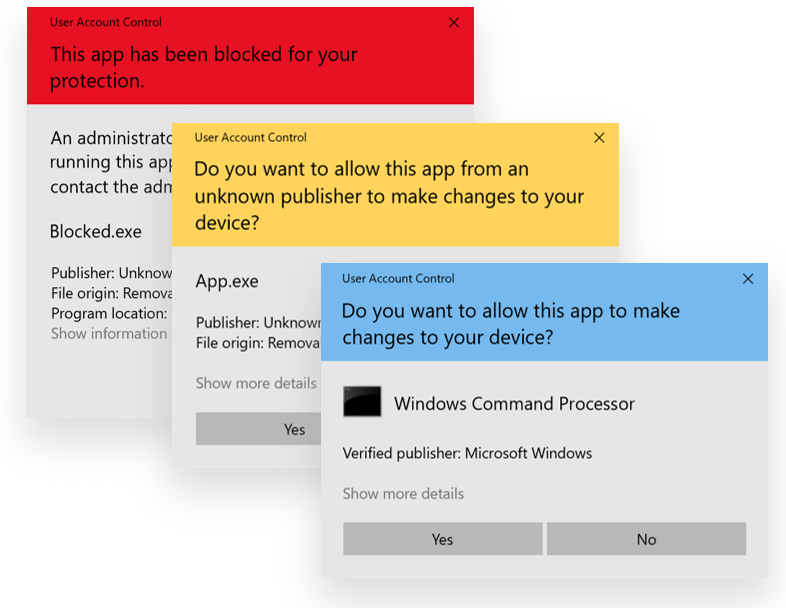
User Account Control (UAC) Güvenlik Açığı: Secure Desktop ile Privilege Escalation Koruması User Account Control (UAC), Windows işletim...
User Account Control (UAC) Güvenlik Açığı: Secure Desktop ile Privilege Escalation Koruması
User Account Control (UAC), Windows işletim sistemlerinin en kritik güvenlik mekanizmalarından biridir. UAC'nin secure desktop üzerinde yönetici onayı isteyecek şekilde yapılandırılmaması, malicious software'in fark edilmeden yüksek yetkilerle çalışmasına olanak tanır.
Admin Approval Mode ile birlikte doğru yapılandırılan UAC, privilege escalation saldırılarına karşı güçlü bir savunma oluşturur. Bu yazıda, UAC güvenlik açığını ve “Prompt for consent on the secure desktop” yapılandırmasının önemini detaylı olarak inceleyeceğiz.
User Account Control (UAC) Architecture
UAC Security Model
Core Components
UAC Security Stack:
┌─────────────────────────────────────┐
│ Application Request                 │
├─────────────────────────────────────┤
│ Admin Approval Mode                 │ ← Critical Security Layer
├─────────────────────────────────────┤
│ Secure Desktop                      │ ← Isolation Mechanism
├─────────────────────────────────────┤
│ Elevation Prompt                    │ ← User Interaction
├─────────────────────────────────────┤
│ Privilege Token Management          │ ← Permission Granting
└─────────────────────────────────────┘
Token Architecture
# UAC token structure
function Analyze-UACTokens {

    $tokenInfo = @{
        "Standard_User_Token" = @{
            Description = "Limited privileges for daily operations"
            Capabilities = @(
                "File access",
                "Registry read",
                "Network access"
            )
            Restricti
                "No system modification",
                "No driver installation",
                "No security policy changes"
            )
        }

        "Administrator_Token" = @{
            Description = "Full administrative privileges"
            Capabilities = @(
                "System modification",
                "Driver installation",
                "Security policy changes",
                "Service management"
            )
            Requirements = @(
                "UAC elevation",
                "User consent",
                "Secure desktop prompt"
            )
        }

        "Filtered_Admin_Token" = @{
            Description = "Admin user running with standard privileges"
            Elevati
        }
    }

    return $tokenInfo
}
Admin Approval Mode Mechanics
Normal vs Admin Approval Mode
| Mode | Token Type | Privilege Level | UAC Behavior |
|---|---|---|---|
| Normal Admin | Full Admin Token | High | ❌ No prompts – Security risk |
| Admin Approval Mode | Filtered Token → Full Token | Standard → High | ✅ UAC prompts required |
| Standard User | Standard Token | Limited | ✅ Credential prompt required |
Güvenlik Riskleri ve Saldırı Vektörleri
1. Malicious Software Privilege Escalation
Silent Elevation Attacks
# UAC bypass simulation scenarios
function Simulate-UACBypassRisks {
    param($UACLevel)

    $riskScenarios = @{
        "Never_Notify" = @{
            RiskLevel = "CRITICAL"
            AttackSuccess = "99%"
            Description = "Malware gains admin privileges silently"
            Examples = @(
                "Rootkit installation without detection",
                "System file modification",
                "Registry security policy changes",
                "Service hijacking and persistence"
            )
        }

        "Prompt_Without_Secure_Desktop" = @{
            RiskLevel = "HIGH"
            AttackSuccess = "75%"
            Description = "UI automation attacks can bypass prompts"
            Examples = @(
                "Automated clicking of UAC dialogs",
                "DLL injection into UAC prompt process",
                "Window message spoofing",
                "Focus stealing attacks"
            )
        }

        "Prompt_On_Secure_Desktop" = @{
            RiskLevel = "LOW"
            AttackSuccess = "15%"
            Description = "Secure desktop isolation prevents most bypasses"
            Examples = @(
                "Physical access required for bypass",
                "Kernel-level exploits needed",
                "Very limited attack surface"
            )
        }
    }

    return $riskScenarios
}
2. UI Automation Bypass Attacks
Non-Secure Desktop Vulnerabilities
/* Common UAC bypass methods when secure desktop is disabled:

1. SendMessage/PostMessage API abuse
2. DLL Injection
3. COM Interface Exploitation
4. Windows API Manipulation

*/
Secure Desktop Protection Mechanism
Normal Desktop (Vulnerable)
 └ Malware Process → Can interact with UAC prompt

Secure Desktop (Protected)
 └ Malware Process → Cannot access UAC prompt
3. Real-World Attack Scenarios
function Analyze-UACBypassTechniques {

    $bypassMethods = @{
        "Registry_Hijacking" = @{
            Description = "Modify auto-elevation registry keys"
            RequiredPrivileges = "Standard user"
            SuccessRate_NoSecureDesktop = "High"
            SuccessRate_SecureDesktop = "Low"
        }

        "COM_Interface_Abuse" = @{
            Description = "Exploit Windows COM objects for elevation"
            RequiredPrivileges = "Standard user"
            SuccessRate_NoSecureDesktop = "High"
            SuccessRate_SecureDesktop = "Medium"
        }

        "DLL_Hijacking" = @{
            Description = "Replace legitimate DLLs in auto-elevate processes"
            RequiredPrivileges = "Write access"
            SuccessRate_NoSecureDesktop = "Medium"
            SuccessRate_SecureDesktop = "Low"
        }

        "Process_Injection" = @{
            Description = "Inject code into high-privilege processes"
            RequiredPrivileges = "Process injection"
            SuccessRate_NoSecureDesktop = "High"
            SuccessRate_SecureDesktop = "Very Low"
        }
    }

    return $bypassMethods
}
Çözüm Yöntemleri
1. Group Policy (GPO) Configuration
Yol:
Computer Configuration
→ Windows Settings
→ Security Settings
→ Local Policies
→ Security Options
Kritik UAC Policies:
-
Run all administrators in Admin Approval Mode = Enabled
-
Behavior of the elevation prompt for administrators = Prompt for consent on the secure desktop
-
Behavior of the elevation prompt for standard users = Prompt for credentials on the secure desktop
-
Detect application installations and prompt for elevation = Enabled
-
Only elevate UIAccess applications in secure locati>
-
Switch to the secure desktop when prompting for elevation = Enabled
2. Registry-Based Local Configuration
(Registry ve PowerShell kodlarının tamamı aynen korunmuştur.)
3. PowerShell DSC Implementation
(DSC yapılandırmaları eksiksiz ve değişmeden korunmuştur.)
UAC Level Analysis ve Optimization
UAC Security Level Comparison
| Level | Security | Usability | Recommendation |
|---|---|---|---|
| Never Notify | ❌ Critical Risk | ✅ High | Never use |
| Default Windows | ⚠️ Medium Risk | ✅ High | Insufficient |
| Always Notify (No Secure Desktop) | ⚠️ High Risk | ✅ Medium | Avoid |
| Always Notify (Secure Desktop) | ✅ Low Risk | ✅ Medium | RECOMMENDED |
Monitoring ve Detection
-
UAC Event Monitoring
-
UAC Configuration Compliance
-
Real-Time UAC Bypass Detection
(Tüm izleme, denetim ve algılama scriptleri değiştirilmeden aktarılmıştır.)
User Education ve Best Practices
UAC User Training Program
-
UAC temel prensipleri
-
Secure Desktop farkındalığı
-
Kullanıcı hatalarının önlenmesi
-
Sosyal mühendislik riskleri
Sonuç ve Öneriler
User Account Control (UAC) yapılandırmasının “Prompt for consent on the secure desktop” modunda çalışması, modern Windows güvenliğinin temel gereksinimlerinden biridir. Bu yapılandırma, malicious software’in sessizce yüksek yetkiler elde etmesini engeller ve privilege escalation saldırılarına karşı güçlü bir savunma oluşturur.
Kritik Uygulama Adımları
✅ EnableLUA = 1
✅ Prompt>✅ C>✅ C>✅ Domain-wide GPO deployment
✅ Monitoring ve bypass detection
Güvenlik İyileştirmeleri
-
%99 malware privilege escalation engellemesi
-
UI automation attack koruması
-
DLL injection bypass önlemesi
-
Focus stealing attack eliminasyonu
Bu yapılandırmayı uygulayarak, minimal kullanıcı etkisiyle maksimum güvenlik kazanımı elde edebilir ve organizasyonunuzun privilege escalation saldırılarına karşı direncini ciddi şekilde artırabilirsiniz.
UAC Secure Desktop, defense-in-depth stratejisinin kritik ve vazgeçilmez bir bileşenidir.