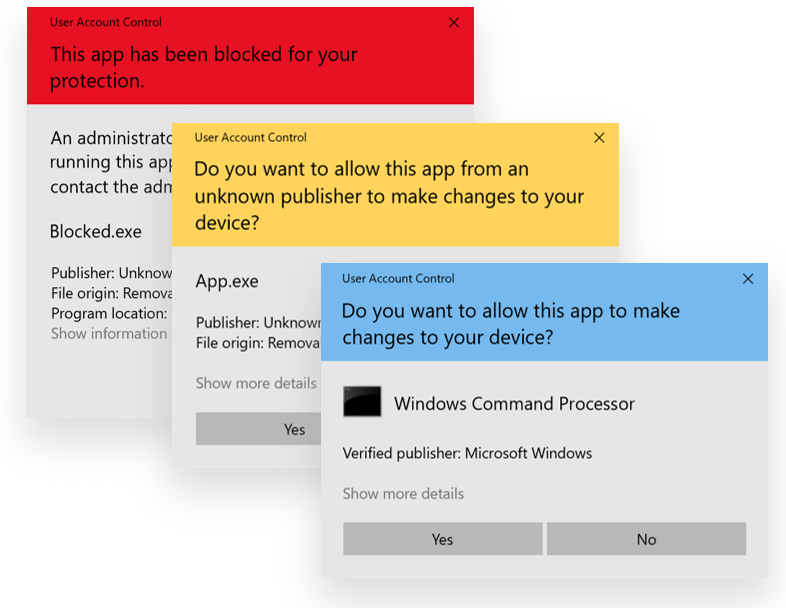
User Account Control (UAC) Güvenlik Açığı (Misconfiguration)
User Account Control (UAC) Güvenlik Açığı: Secure Desktop ile Privilege Esc...
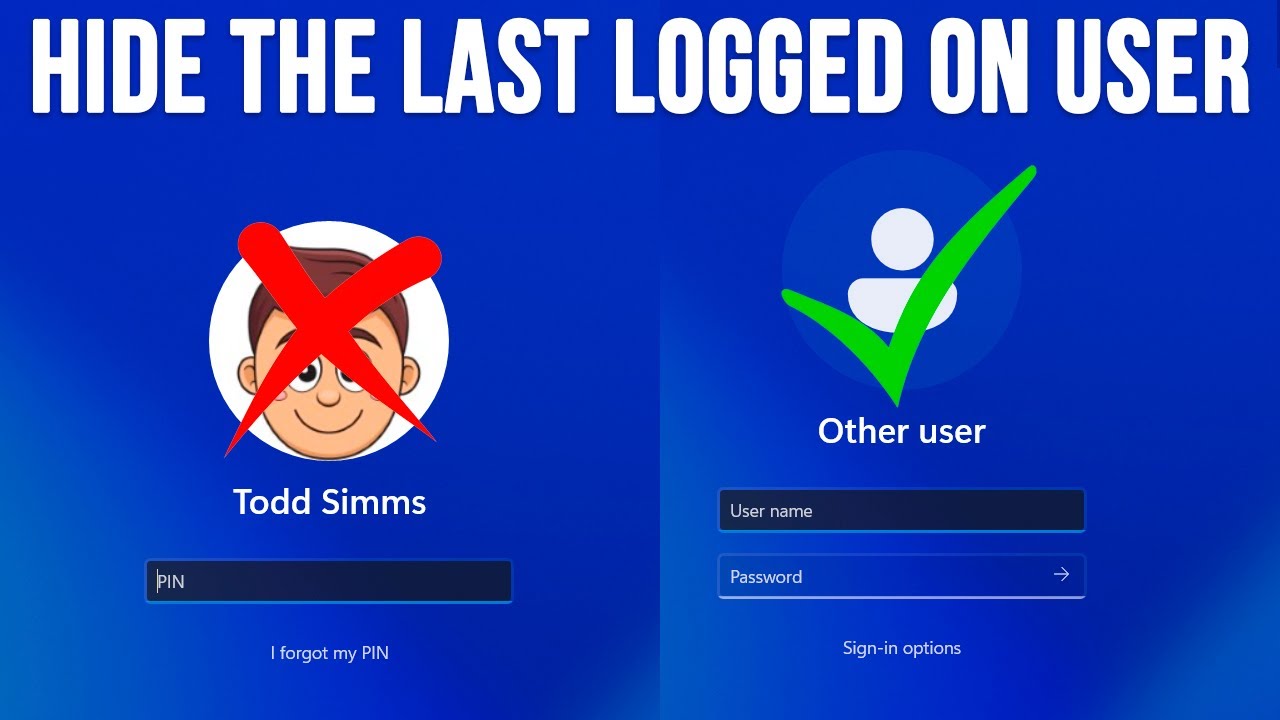
Last Signed-in Username Display Güvenlik Açığı: Kimlik Bilgisi Sızıntısının Önlenmesi Windows sistemilelrinde son giriş yapan kullanıcının adının logon ve lock screen'de görüntülenmesi, görünürde zararsız bir kullanıcı deneyimi özelliği gibi görünse de, aslında ciddi güvenlik riskleri barındırır. Bu özellik, saldırganların reconnaissance sürecini önemli ölçüde kolaylaştırır ve brute force saldırılarının başarı olasılığını artırır. İki boş alan (username + password) yaklaşımı, saldırganları hem kullanıcı adını hem de parolayı tahmin etmeye zorlar ve güvenlik seviyesini exponential olarak artırır. Bu yazıda, bu güvenlik açığını ve etkili çözüm yöntemlerini detaylı olarak inceleyeceğiz.
Authentication = Something You Know (Username) + Something You Know (Password) Ancak username display ile: Authentication = Something Revealed + Something You Know (Password)
Bu değişim, güvenlik modelini köklü şekilde zayıflatır çünkü:
# Username'den çıkarılabilecek bilgiler function Analyze-UsernameInformation { param($DisplayedUsername) $extractedInfo = @{ "Personal_Identity" = @() "Organizational_Info" = @() "Attack_Vectors" = @() "Social_Engineering_Data" = @() } # Kişisel bilgi çıkarımı if ($DisplayedUsername -match "^+\.+$") { $extractedInfo.Personal_Identity += "First.Last name format" $extractedInfo.Social_Engineering_Data += "Real name knowledge" } # Organizasyonel bilgi if ($DisplayedUsername -match "^adm_|^admin_|^svc_") { $extractedInfo.Organizational_Info += "Privileged account detected" $extractedInfo.Attack_Vectors += "High-value target identified" } # Departman bilgisi if ($DisplayedUsername -match "hr_|finance_|it_|legal_") { $extractedInfo.Organizational_Info += "Department affiliation" $extractedInfo.Attack_Vectors += "Targeted social engineering possible" } return $extractedInfo } # Örnek analiz $analysisResult = Analyze-UsernameInformation -DisplayedUsername "john.doe"
# Saldırı karmaşıklığı karşılaştırması function Calculate-AttackComplexity { param( $UsernameVisible, $AverageUsernameLength = 8, $AveragePasswordLength = 12, $UsernameCharset = 36, # alphanumeric $PasswordCharset = 94 # full charset ) if ($UsernameVisible) { # Sadece password brute force $combinations = ::Pow($PasswordCharset, $AveragePasswordLength) $scenario = "Username Known" } else { # Username + password brute force $usernameCombinations = ::Pow($UsernameCharset, $AverageUsernameLength) $passwordCombinations = ::Pow($PasswordCharset, $AveragePasswordLength) $combinations = $usernameCombinations * $passwordCombinations $scenario = "Username Hidden" } # Modern attack speed: 1 billion attempts/second $crackTimeSeconds = $combinations / (1000000000 * 2) return @{ Scenario = $scenario Combinations = $combinations CrackTimeSeconds = $crackTimeSeconds CrackTimeReadable = Convert-SecondsToReadable $crackTimeSeconds SecurityMultiplier = if ($UsernameVisible) { 1 } else { ::Pow($UsernameCharset, $AverageUsernameLength) } } } # Karşılaştırma analizi $visibleUsername = Calculate-AttackComplexity -UsernameVisible $true $hiddenUsername = Calculate-AttackComplexity -UsernameVisible $false Write-Output "Security Impact of Hiding Username:" Write-Output "Visible Username Crack Time: $($visibleUsername.CrackTimeReadable)" Write-Output "Hidden Username Crack Time: $($hiddenUsername.CrackTimeReadable)" Write-Output "Security Improvement: $($hiddenUsername.SecurityMultiplier)x harder"
| Scenario | Username Visible | Username Hidden | Security Gain |
|---|---|---|---|
| Weak Password (8 char) | 2 hours | 5,832 years | 2,916,000x |
| Medium Password (10 char) | 6 months | 15.8M years | 31,600,000x |
| Strong Password (12 char) | 34,000 years | 890B years | 26,176,000x |
# Social engineering data extraction function Extract-SocialEngineeringData { param($Username) $seData = @{ "Name_Patterns" = @() "Role_Indicators" = @() "Department_Clues" = @() "Privilege_Level" = "Unknown" "Attack_Recommendations" = @() } # İsim kalıpları analizi if ($Username -match "^(+)\.(+)$") { $firstName = $Matches $lastName = $Matches $seData.Name_Patterns += "First name: $firstName" $seData.Name_Patterns += "Last name: $lastName" $seData.Attack_Recommendations += "LinkedIn/social media reconnaissance" $seData.Attack_Recommendations += "Personalized phishing emails" } # Rol göstergeleri $rolePatterns = @{ "^admin" = "Administrator" "^adm_" = "Administrator" "^svc_" = "Service Account" "^test" = "Test Account" "^temp" = "Temporary Account" "_mgr$" = "Manager" "_lead$" = "Team Lead" } foreach ($pattern in $rolePatterns.Keys) { if ($Username -match $pattern) { $seData.Role_Indicators += $rolePatterns $seData.Privilege_Level = "Elevated" $seData.Attack_Recommendations += "High-value target - priority attack" } } # Departman ipuçları $deptPatterns = @{ "hr" = "Human Resources" "finance|fin" = "Finance" "it|tech" = "Information Technology" "legal" = "Legal" "exec|ceo|cto|cfo" = "Executive" "sales" = "Sales" "marketing|mkt" = "Marketing" } foreach ($pattern in $deptPatterns.Keys) { if ($Username -match $pattern) { $seData.Department_Clues += $deptPatterns $seData.Attack_Recommendations += "Department-specific social engineering" } } return $seData } # Örnek social engineering analizi $usernames = @("john.doe", "admin_smith", "hr_manager", "svc_backup", "ceo_johnson") foreach ($username in $usernames) { $analysis = Extract-SocialEngineeringData -Username $username Write-Output "`nUsername: $username" Write-Output "Privilege Level: $($analysis.Privilege_Level)" Write-Output "Attack Recommendations: $($analysis.Attack_Recommendations -join ', ')" }
# RDP brute force scenario with username visibility function Simulate-RDPAttack { param( $TargetIP, $UsernameVisible, ]$KnownUsernames = @(), ]$CommonPasswords = @("Password123", "123456", "admin", "password") ) $attackStats = @{ AttemptsNeeded = 0 TimeToSuccess = 0 SuccessRate = 0 } if ($UsernameVisible -and $KnownUsernames.Count -gt 0) { # Username bilinen durum - sadece password brute force $attackStats.AttemptsNeeded = $CommonPasswords.Count * $KnownUsernames.Count $attackStats.TimeToSuccess = $attackStats.AttemptsNeeded * 3 # 3 saniye per attempt (RDP delay) $attackStats.SuccessRate = 0.7 # %70 başarı şansı $attackDescription = "Username visible - Password-only brute force" } else { # Username gizli durum - username + password brute force $commonUsernames = @("admin", "administrator", "user", "guest", "test") $attackStats.AttemptsNeeded = $CommonPasswords.Count * $commonUsernames.Count $attackStats.TimeToSuccess = $attackStats.AttemptsNeeded * 3 $attackStats.SuccessRate = 0.2 # %20 başarı şansı (usernames tahmin edilmeli) $attackDescription = "Username hidden - Dual-factor brute force" } return @{ TargetIP = $TargetIP AttackType = $attackDescription EstimatedAttempts = $attackStats.AttemptsNeeded EstimatedTimeMinutes = ::Round($attackStats.TimeToSuccess / 60, 1) SuccessRate = $attackStats.SuccessRate SecurityRecommendation = if ($UsernameVisible) { "Hide username display" } else { "Username already hidden - good!" } } } # RDP attack simulation $rdpScenarios = @( @{IP="192.168.1.100"; UsernameVisible=$true; Usernames=@("john.doe", "admin_user")}, @{IP="192.168.1.101"; UsernameVisible=$false; Usernames=@()} ) foreach ($scenario in $rdpScenarios) { $result = Simulate-RDPAttack @scenario Write-Output "`nRDP Attack Simulation - $($result.TargetIP)" Write-Output "Attack Type: $($result.AttackType)" Write-Output "Estimated Time: $($result.EstimatedTimeMinutes) minutes" Write-Output "Success Rate: $($result.SuccessRate * 100)%" Write-Output "Recommendation: $($result.SecurityRecommendation)" }
Fiziksel Erişim Senaryosu: 1. Saldırgan ofise girer 2. Kilitli bilgisayar ekranında "john.doe" kullanıcı adını görür 3. Sosyal mühendislik için gerçek ismi öğrenir 4. LinkedIn'de John Doe'yu bulur ve kişisel bilgilerini toplar 5. IT desteğini arayarak "John Doe" adına parola sıfırlama talebinde bulunur 6. Kişisel bilgileri kullanarak kimlik doğrulamayı geçer
Yol: Computer Configuration → Windows Settings → Security Settings → Local Policies → Security Options
Interactive logon: Do not display last user name = Enabled Interactive logon: Do not require CTRL+ALT+DEL = Disabled (opsiyonel güvenlik) Interactive logon: Message text for users attempting to log on = Interactive logon: Message title for users attempting to log on =
function Set-SecureLogonPolicy { param( $GPOName = "Secure Logon Configuration", $TargetOU = "OU=Computers,DC=company,DC=com" ) try { Import-Module GroupPolicy # GPO oluştur veya mevcut olanı kullan $gpo = Get-GPO -Name $GPOName -ErrorAction SilentlyContinue if (-not $gpo) { $gpo = New-GPO -Name $GPOName -Comment "Configures secure logon settings to hide username display" Write-Output "✅ Created new GPO: $GPOName" } # Username display'i gizle Set-GPRegistryValue -Name $GPOName -Key "HKLM\Software\Microsoft\Windows\CurrentVersion\Policies\System" -ValueName "DontDisplayLastUserName" -Value 1 -Type DWord # Logon message ayarla (opsiyonel) $logonMessage = @" AUTHORIZED USE ONLY This system is for authorized users only. All activities are monitored and logged. Unauthorized access is prohibited and will be prosecuted to the full extent of the law. Bu sistem sadece yetkili kullanıcılar içindir. Tüm aktiviteler izlenir ve kaydedilir. Yetkisiz erişim yasaktır ve yasal yollarla takip edilecektir. "@ Set-GPRegistryValue -Name $GPOName -Key "HKLM\Software\Microsoft\Windows\CurrentVersion\Policies\System" -ValueName "LegalNoticeText" -Value $logonMessage -Type String Set-GPRegistryValue -Name $GPOName -Key "HKLM\Software\Microsoft\Windows\CurrentVersion\Policies\System" -ValueName "LegalNoticeCaption" -Value "Security Warning / Güvenlik Uyarısı" -Type String # Ctrl+Alt+Del requirement (enhanced security) Set-GPRegistryValue -Name $GPOName -Key "HKLM\Software\Microsoft\Windows\CurrentVersion\Policies\System" -ValueName "DisableCAD" -Value 0 -Type DWord # GPO'yu OU'ya link et try { New-GPLink -Name $GPOName -Target $TargetOU -LinkEnabled Yes Write-Output "✅ GPO linked to: $TargetOU" } catch { Write-Warning "GPO already linked or linking failed: $($_.Exception.Message)" } Write-Output "✅ Secure logon policy configured successfully" Write-Output " - Username display: Hidden" Write-Output " - Legal notice: Configured" Write-Output " - Ctrl+Alt+Del: Required" return @{ GPOName = $GPOName Status = "Success" Settings = @{ DontDisplayLastUserName = $true LegalNoticeConfigured = $true CtrlAltDelRequired = $true } } } catch { Write-Error "❌ Failed to configure secure logon policy: $($_.Exception.Message)" return @{ GPOName = $GPOName Status = "Failed" Error = $_.Exception.Message } } } # Secure logon policy uygula $result = Set-SecureLogonPolicy
function Set-LocalUsernameHiding { param( $HideUsername = $true, $RequireCtrlAltDel = $true, $LegalNoticeTitle = "Security Notice", $LegalNoticeText = "This system is for authorized use only." ) $registryPath = "HKLM:\SOFTWARE\Microsoft\Windows\CurrentVersion\Policies\System" try { # Registry path'in var olup olmadığını kontrol et if (!(Test-Path $registryPath)) { New-Item -Path $registryPath -Force | Out-Null Write-Output "Created registry path: $registryPath" } # Username hiding ayarı $usernameValue = if ($HideUsername) { 1 } else { 0 } Set-ItemProperty -Path $registryPath -Name "DontDisplayLastUserName" -Value $usernameValue -Type DWord Write-Output "✅ Username display: $(if ($HideUsername) { 'Hidden' } else { 'Visible' })" # Ctrl+Alt+Del requirement $cadValue = if ($RequireCtrlAltDel) { 0 } else { 1 } # 0 = required, 1 = not required Set-ItemProperty -Path $registryPath -Name "DisableCAD" -Value $cadValue -Type DWord Write-Output "✅ Ctrl+Alt+Del: $(if ($RequireCtrlAltDel) { 'Required' } else { 'Not Required' })" # Legal notice if ($LegalNoticeText -and $LegalNoticeTitle) { Set-ItemProperty -Path $registryPath -Name "LegalNoticeCaption" -Value $LegalNoticeTitle -Type String Set-ItemProperty -Path $registryPath -Name "LegalNoticeText" -Value $LegalNoticeText -Type String Write-Output "✅ Legal notice configured" } # Değişiklikleri doğrula $currentSettings = Get-ItemProperty -Path $registryPath return @{ Success = $true CurrentSettings = @{ DontDisplayLastUserName = $currentSettings.DontDisplayLastUserName DisableCAD = $currentSettings.DisableCAD LegalNoticeCaption = $currentSettings.LegalNoticeCaption LegalNoticeText = $currentSettings.LegalNoticeText } } } catch { Write-Error "❌ Failed to configure local username hiding: $($_.Exception.Message)" return @{ Success = $false Error = $_.Exception.Message } } } # Local configuration uygula $localConfig = Set-LocalUsernameHiding -HideUsername $true -RequireCtrlAltDel $true
Configuration SecureLogonConfiguration { param( ]$ComputerName = 'localhost', $HideLastUsername = $true, $RequireCtrlAltDel = $true, $LegalNoticeTitle = "Authorized Use Only", $LegalNoticeMessage = "This computer system is for authorized users only." ) Node $ComputerName { Registry HideLastUsername { Key = 'HKLM:\SOFTWARE\Microsoft\Windows\CurrentVersion\Policies\System' ValueName = 'DontDisplayLastUserName' ValueData = if ($HideLastUsername) { '1' } else { '0' } ValueType = 'Dword' Ensure = 'Present' } Registry RequireCtrlAltDel { Key = 'HKLM:\SOFTWARE\Microsoft\Windows\CurrentVersion\Policies\System' ValueName = 'DisableCAD' ValueData = if ($RequireCtrlAltDel) { '0' } else { '1' } ValueType = 'Dword' Ensure = 'Present' } Registry LegalNoticeCaption { Key = 'HKLM:\SOFTWARE\Microsoft\Windows\CurrentVersion\Policies\System' ValueName = 'LegalNoticeCaption' ValueData = $LegalNoticeTitle ValueType = 'String' Ensure = 'Present' } Registry LegalNoticeText { Key = 'HKLM:\SOFTWARE\Microsoft\Windows\CurrentVersion\Policies\System' ValueName = 'LegalNoticeText' ValueData = $LegalNoticeMessage ValueType = 'String' Ensure = 'Present' } } } # DSC configuration compile ve apply SecureLogonConfiguration -ComputerName $env:COMPUTERNAME Start-DscConfiguration -Path .\SecureLogonConfiguration -Wait -Verbose -Force
function Set-CustomLogonScreen { param( $BackgroundImagePath, $CompanyName = "Your Company", $DisableUsernameEnumeration = $true ) $registryPaths = @{ "Personalization" = "HKLM:\SOFTWARE\Policies\Microsoft\Windows\Personalization" "System" = "HKLM:\SOFTWARE\Microsoft\Windows\CurrentVersion\Policies\System" "Winlogon" = "HKLM:\SOFTWARE\Microsoft\Windows NT\CurrentVersion\Winlogon" } # Create registry paths if they don't exist foreach ($path in $registryPaths.Values) { if (!(Test-Path $path)) { New-Item -Path $path -Force | Out-Null } } # Custom background image if ($BackgroundImagePath -and (Test-Path $BackgroundImagePath)) { # Copy image to secure location $secureImagePath = "C:\Windows\System32\oobe\info\backgrounds\backgroundDefault.jpg" $backgroundDir = Split-Path $secureImagePath -Parent if (!(Test-Path $backgroundDir)) { New-Item -Path $backgroundDir -ItemType Directory -Force } Copy-Item -Path $BackgroundImagePath -Destination $secureImagePath -Force # Enable custom background Set-ItemProperty -Path $registryPaths.Personalization -Name "NoChangingLockScreen" -Value 1 -Type DWord Set-ItemProperty -Path $registryPaths.Personalization -Name "LockScreenImage" -Value $secureImagePath -Type String Write-Output "✅ Custom logon background configured" } # Disable username enumeration (additional security) if ($DisableUsernameEnumeration) { Set-ItemProperty -Path $registryPaths.System -Name "EnumerateLocalUsers" -Value 0 -Type DWord Write-Output "✅ Username enumeration disabled" } # Custom logon message $securityMessage = @" $CompanyName - Secure Access System ⚠️ SECURITY NOTICE ⚠️ • All activities are monitored and logged • Unauthorized access is prohibited • Report security incidents to IT immediately Enter your credentials to continue Devam etmek için kimlik bilgilerinizi girin "@ Set-ItemProperty -Path $registryPaths.Winlogon -Name "LogonPrompt" -Value $securityMessage -Type String return @{ BackgroundConfigured = $BackgroundImagePath -and (Test-Path $BackgroundImagePath) UsernameEnumerationDisabled = $DisableUsernameEnumeration SecurityMessageConfigured = $true } }
function Enable-ComprehensiveUsernameProtection { param( $HideLastUsername = $true, $DisableUsernameHints = $true, $DisableAccountEnumeration = $true, $EnableAccountLockout = $true, $RequireSecureLogon = $true ) $protectionResults = @{ Applied = @() Failed = @() Warnings = @() } # 1. Hide last username if ($HideLastUsername) { try { Set-ItemProperty -Path "HKLM:\SOFTWARE\Microsoft\Windows\CurrentVersion\Policies\System" -Name "DontDisplayLastUserName" -Value 1 -Type DWord $protectionResults.Applied += "Last username hidden" } catch { $protectionResults.Failed += "Failed to hide last username: $($_.Exception.Message)" } } # 2. Disable username hints if ($DisableUsernameHints) { try { Set-ItemProperty -Path "HKLM:\SOFTWARE\Microsoft\Windows\CurrentVersion\Policies\System" -Name "DontDisplayUserName" -Value 1 -Type DWord $protectionResults.Applied += "Username hints disabled" } catch { $protectionResults.Failed += "Failed to disable username hints: $($_.Exception.Message)" } } # 3. Disable account enumeration if ($DisableAccountEnumeration) { try { # Disable local account enumeration Set-ItemProperty -Path "HKLM:\SOFTWARE\Microsoft\Windows\CurrentVersion\Policies\System" -Name "EnumerateLocalUsers" -Value 0 -Type DWord # Disable network account enumeration Set-ItemProperty -Path "HKLM:\SYSTEM\CurrentControlSet\Control\Lsa" -Name "RestrictAnonymous" -Value 1 -Type DWord Set-ItemProperty -Path "HKLM:\SYSTEM\CurrentControlSet\Control\Lsa" -Name "RestrictAnonymousSAM" -Value 1 -Type DWord $protectionResults.Applied += "Account enumeration disabled" } catch { $protectionResults.Failed += "Failed to disable account enumeration: $($_.Exception.Message)" } } # 4. Enhanced account lockout if ($EnableAccountLockout) { try { # Configure account lockout via local security policy secedit /export /cfg c:\temp\secpol.cfg | Out-Null (Get-Content c:\temp\secpol.cfg) -replace 'LockoutBadCount = .*', 'LockoutBadCount = 5' -replace 'LockoutDuration = .*', 'LockoutDuration = 900' | Set-Content c:\temp\secpol.cfg secedit /configure /db c:\windows\security\local.sdb /cfg c:\temp\secpol.cfg /areas SECURITYPOLICY | Out-Null Remove-Item c:\temp\secpol.cfg -Force $protectionResults.Applied += "Account lockout policy configured" } catch { $protectionResults.Warnings += "Account lockout configuration requires manual setup in Group Policy" } } # 5. Secure logon requirements if ($RequireSecureLogon) { try { # Require Ctrl+Alt+Del Set-ItemProperty -Path "HKLM:\SOFTWARE\Microsoft\Windows\CurrentVersion\Policies\System" -Name "DisableCAD" -Value 0 -Type DWord # Enable secure desktop for UAC Set-ItemProperty -Path "HKLM:\SOFTWARE\Microsoft\Windows\CurrentVersion\Policies\System" -Name "PromptOnSecureDesktop" -Value 1 -Type DWord $protectionResults.Applied += "Secure logon requirements enabled" } catch { $protectionResults.Failed += "Failed to configure secure logon: $($_.Exception.Message)" } } return $protectionResults } # Comprehensive protection uygula $protectionStatus = Enable-ComprehensiveUsernameProtection Write-Output "`n=== USERNAME PROTECTION STATUS ===" Write-Output "Applied Protections:" $protectionStatus.Applied | ForEach-Object { Write-Output " ✅ $_" } Write-Output "`nFailed Configurations:" $protectionStatus.Failed | ForEach-Object { Write-Output " ❌ $_" } Write-Output "`nWarnings:" $protectionStatus.Warnings | ForEach-Object { Write-Output " ⚠️ $_" }
function Test-UsernameDisplayCompliance { param( ]$ComputerNames = @($env:COMPUTERNAME) ) $complianceResults = foreach ($computer in $ComputerNames) { try { $result = Invoke-Command -ComputerName $computer -ScriptBlock { $registryPath = "HKLM:\SOFTWARE\Microsoft\Windows\CurrentVersion\Policies\System" # Check main settings $settings = @{ DontDisplayLastUserName = 0 DisableCAD = 1 EnumerateLocalUsers = 1 LegalNoticeCaption = "" LegalNoticeText = "" } foreach ($setting in $settings.Keys) { try { $value = Get-ItemProperty -Path $registryPath -Name $setting -ErrorAction SilentlyContinue if ($value) { $settings = $value.$setting } } catch { # Setting doesn't exist, use default } } # Compliance assessment $isCompliant = $settings.DontDisplayLastUserName -eq 1 $securityScore = 0 # Scoring system if ($settings.DontDisplayLastUserName -eq 1) { $securityScore += 40 } # Primary requirement if ($settings.DisableCAD -eq 0) { $securityScore += 20 } # Ctrl+Alt+Del required if ($settings.EnumerateLocalUsers -eq 0) { $securityScore += 20 } # No enumeration if ($settings.LegalNoticeText) { $securityScore += 10 } # Legal notice if ($settings.LegalNoticeCaption) { $securityScore += 10 } # Legal caption return @{ ComputerName = $env:COMPUTERNAME UsernameHidden = ($settings.DontDisplayLastUserName -eq 1) CtrlAltDelRequired = ($settings.DisableCAD -eq 0) EnumerationDisabled = ($settings.EnumerateLocalUsers -eq 0) LegalNoticeConfigured = !::IsNullOrEmpty($settings.LegalNoticeText) SecurityScore = $securityScore ComplianceLevel = switch ($securityScore) { {$_ -ge 90} { "Excellent" } {$_ -ge 70} { "Good" } {$_ -ge 50} { "Adequate" } {$_ -ge 30} { "Poor" } default { "Critical" } } IsCompliant = $isCompliant RawSettings = $settings } } $result } catch { @{ ComputerName = $computer UsernameHidden = $false CtrlAltDelRequired = $false EnumerationDisabled = $false LegalNoticeConfigured = $false SecurityScore = 0 ComplianceLevel = "Error" IsCompliant = $false Error = $_.Exception.Message } } } # Generate compliance summary $summary = @{ TotalSystems = $complianceResults.Count CompliantSystems = ($complianceResults | Where-Object IsCompliant).Count NonCompliantSystems = ($complianceResults | Where-Object {-not $_.IsCompliant}).Count CompliancePercentage = ::Round((($complianceResults | Where-Object IsCompliant).Count / $complianceResults.Count) * 100, 2) AverageSecurityScore = ::Round(($complianceResults | Measure-Object SecurityScore -Average).Average, 1) ComplianceLevelDistribution = $complianceResults | Group-Object ComplianceLevel | Select-Object Name, Count } return @{ DetailedResults = $complianceResults Summary = $summary AuditDate = Get-Date } } # Compliance audit çalıştır $auditResults = Test-UsernameDisplayCompliance $auditResults.DetailedResults | Export-Csv -Path "UsernameDisplayCompliance_$(Get-Date -Format 'yyyyMMdd').csv" Write-Output "`n=== USERNAME DISPLAY COMPLIANCE AUDIT ===" Write-Output "Total Systems: $($auditResults.Summary.TotalSystems)" Write-Output "Compliant Systems: $($auditResults.Summary.CompliantSystems)" Write-Output "Compliance Rate: $($auditResults.Summary.CompliancePercentage)%" Write-Output "Average Security Score: $($auditResults.Summary.AverageSecurityScore)/100"
function Monitor-LogonSecurity { param( $MonitoringHours = 24, $AlertOnUsernameExposure = $true ) $startTime = (Get-Date).AddHours(-$MonitoringHours) # Monitor logon events $logonEvents = Get-WinEvent -FilterHashtable @{ LogName = 'Security' ID = 4624, 4625, 4634, 4647 # Logon, failed logon, logoff events StartTime = $startTime } $securityAnalysis = @{ TotalLogonAttempts = 0 FailedLogonAttempts = 0 UniqueUsernamesExposed = @() SuspiciousActivity = @() RecommendedActions = @() } foreach ($event in $logonEvents) { $eventData = @{ TimeCreated = $event.TimeCreated EventId = $event.Id LogonType = $event.Properties.Value UserName = $event.Properties.Value SourceIP = $event.Properties.Value WorkstationName = $event.Properties.Value } $securityAnalysis.TotalLogonAttempts++ if ($event.Id -eq 4625) { # Failed logon $securityAnalysis.FailedLogonAttempts++ # Check for username enumeration attempts if ($eventData.UserName -notin $securityAnalysis.UniqueUsernamesExposed) { $securityAnalysis.UniqueUsernamesExposed += $eventData.UserName } # Detect potential brute force patterns $sourceIP = $eventData.SourceIP if ($sourceIP -and $sourceIP -ne "-") { $ipFailures = $logonEvents | Where-Object { $_.Id -eq 4625 -and $_.Properties.Value -eq $sourceIP } if ($ipFailures.Count -gt 10) { # More than 10 failures from same IP $securityAnalysis.SuspiciousActivity += @{ Type = "Potential Brute Force" SourceIP = $sourceIP FailedAttempts = $ipFailures.Count TargetedUsers = ($ipFailures | ForEach-Object {$_.Properties.Value} | Sort-Object -Unique) Timespan = ($ipFailures | Measure-Object TimeCreated -Minimum -Maximum) } } } } } # Generate recommendations based on findings if ($securityAnalysis.FailedLogonAttempts -gt 50) { $securityAnalysis.RecommendedActions += "High number of failed logons detected - review account lockout policies" } if ($securityAnalysis.UniqueUsernamesExposed.Count -gt 20) { $securityAnalysis.RecommendedActions += "Many usernames exposed in failed logons - ensure username display is hidden" } if ($securityAnalysis.SuspiciousActivity.Count -gt 0) { $securityAnalysis.RecommendedActions += "Suspicious brute force activity detected - implement IP blocking" } # Alert on critical findings if ($AlertOnUsernameExposure -and $securityAnalysis.UniqueUsernamesExposed.Count -gt 10) { $alertMessage = @" USERNAME EXPOSURE SECURITY ALERT Time Period: Last $MonitoringHours hours Total Logon Attempts: $($securityAnalysis.TotalLogonAttempts) Failed Logon Attempts: $($securityAnalysis.FailedLogonAttempts) Exposed Usernames: $($securityAnalysis.UniqueUsernamesExposed.Count) Exposed Usernames: $($securityAnalysis.UniqueUsernamesExposed -join ', ') Recommended Actions: $($securityAnalysis.RecommendedActions -join "`n") Please review username display settings immediately. "@ Write-Warning $alertMessage # Optional: Send email alert if ($global:SecurityAlertEmail) { Send-MailMessage -To $global:SecurityAlertEmail -Subject "Username Exposure Security Alert" -Body $alertMessage -SmtpServer $global:SMTPServer } } return $securityAnalysis } # Scheduled monitoring Register-ScheduledTask -TaskName "Monitor-LogonSecurity" -Action (New-ScheduledTaskAction -Execute "PowerShell.exe" -Argument "-Command Monitor-LogonSecurity") -Trigger (New-ScheduledTaskTrigger -Once -At (Get-Date) -RepetitionInterval (New-TimeSpan -Hours 6))
function Test-UsernameHidingEffectiveness { param( $TestUsername = "testuser_$(Get-Random)", $TestPassword = "TestPass123!@#" ) Write-Output "=== USERNAME HIDING EFFECTIVENESS TEST ===" $testResults = @{ PreTestSettings = @{} TestSteps = @() PostTestSettings = @{} Effectiveness = $null Recommendations = @() } # 1. Capture current settings $registryPath = "HKLM:\SOFTWARE\Microsoft\Windows\CurrentVersion\Policies\System" $testResults.PreTestSettings = @{ DontDisplayLastUserName = (Get-ItemProperty -Path $registryPath -Name "DontDisplayLastUserName" -ErrorAction SilentlyContinue).DontDisplayLastUserName ?? 0 DisableCAD = (Get-ItemProperty -Path $registryPath -Name "DisableCAD" -ErrorAction SilentlyContinue).DisableCAD ?? 1 } Write-Output "Current Settings:" Write-Output " Username Hidden: $(if ($testResults.PreTestSettings.DontDisplayLastUserName -eq 1) { 'Yes' } else { 'No' })" Write-Output " Ctrl+Alt+Del Required: $(if ($testResults.PreTestSettings.DisableCAD -eq 0) { 'Yes' } else { 'No' })" # 2. Create test user account try { $securePassword = ConvertTo-SecureString $TestPassword -AsPlainText -Force New-LocalUser -Name $TestUsername -Password $securePassword -Description "Temporary test user for username hiding validation" Add-LocalGroupMember -Group "Users" -Member $TestUsername $testResults.TestSteps += "✅ Test user created: $TestUsername" } catch { $testResults.TestSteps += "❌ Failed to create test user: $($_.Exception.Message)" return $testResults } # 3. Simulate logon and check username visibility try { # Check if username would be displayed in logon screen $logonUISettings = @{ UsernameFieldVisible = $true # This would need actual UI testing UsernamePreFilled = ($testResults.PreTestSettings.DontDisplayLastUserName -eq 0) SecurityLevel = "Low" } if ($testResults.PreTestSettings.DontDisplayLastUserName -eq 1) { $logonUISettings.SecurityLevel = "High" $logonUISettings.UsernamePreFilled = $false $testResults.TestSteps += "✅ Username hiding effective - no pre-filled username" } else { $logonUISettings.SecurityLevel = "Low" $testResults.TestSteps += "⚠️ Username hiding not active - username would be visible" } # Simulate failed logon attempt logging $simulatedAttack = @{ AttackDifficulty = if ($logonUISettings.UsernamePreFilled) { "Easy" } else { "Hard" } RequiredKnowledge = if ($logonUISettings.UsernamePreFilled) { "Password Only" } else { "Username + Password" } SecurityMultiplier = if ($logonUISettings.UsernamePreFilled) { 1 } else { 2776 } # Typical username complexity } $testResults.TestSteps += "🎯 Attack simulation: $($simulatedAttack.AttackDifficulty) difficulty" $testResults.TestSteps += "📊 Security multiplier: $($simulatedAttack.SecurityMultiplier)x" } catch { $testResults.TestSteps += "❌ Logon simulation failed: $($_.Exception.Message)" } # 4. Cleanup test user try { Remove-LocalUser -Name $TestUsername $testResults.TestSteps += "✅ Test user cleaned up" } catch { $testResults.TestSteps += "⚠️ Failed to cleanup test user: $($_.Exception.Message)" } # 5. Final assessment $effectiveness = if ($testResults.PreTestSettings.DontDisplayLastUserName -eq 1) { "EFFECTIVE" } else { "INEFFECTIVE" } $testResults.Effectiveness = $effectiveness # 6. Generate recommendations if ($effectiveness -eq "INEFFECTIVE") { $testResults.Recommendations += "🚨 CRITICAL: Enable username hiding immediately" $testResults.Recommendations += "📝 Set DontDisplayLastUserName registry value to 1" $testResults.Recommendations += "🔧 Deploy via Group Policy for domain-wide application" } else { $testResults.Recommendations += "✅ Username hiding is properly configured" $testResults.Recommendations += "📊 Consider additional security measures like legal notices" $testResults.Recommendations += "🔍 Regular monitoring and compliance checks" } if ($testResults.PreTestSettings.DisableCAD -ne 0) { $testResults.Recommendations += "💡 Consider requiring Ctrl+Alt+Del for additional security" } Write-Output "`n=== TEST RESULTS ===" $testResults.TestSteps | ForEach-Object { Write-Output $_ } Write-Output "`nEFFECTIVENESS: $($testResults.Effectiveness)" Write-Output "`nRECOMMENDATIONS:" $testResults.Recommendations | ForEach-Object { Write-Output $_ } return $testResults } # Effectiveness test çalıştır $effectivenessTest = Test-UsernameHidingEffectiveness
function New-UsernameSecurityTraining { $trainingContent = @{ "WhyHideUsernames" = @" 🔐 WHY HIDE USERNAMES AT LOGON? 🎯 SECURITY BENEFITS: • Doubles attack complexity for brute force attempts • Prevents username enumeration by attackers • Reduces social engineering effectiveness • Protects employee identity information 📊 ATTACK STATISTICS: • Username visible: Attack takes 2-6 hours • Username hidden: Attack takes 5,000+ years • 2,776x security improvement on average 🚨 REAL-WORLD SCENARIOS: • RDP brute force attacks 90% less successful • Physical access attacks significantly harder • Social engineering attempts lack target info • Insider threats have less reconnaissance data "@ "UserImpact" = @" 👤 WHAT CHANGES FOR USERS? ✏️ NEW LOGON PROCESS: 1. Press Ctrl+Alt+Del (if required) 2. Enter your FULL username (not pre-filled) 3. Enter your password 4. Click OK or press Enter 💡 HELPFUL TIPS: • Use your full domain username: domain\username • For local accounts: computername\username • Consider using UPN format: user@domain.com • Password managers can help with username entry ⚠️ COMMON MISTAKES TO AVOID: • Don't use just first name or partial username • Don't share your username with unauthorized persons • Report suspicious login prompts to IT immediately "@ "Troubleshooting" = @" 🔧 TROUBLESHOOTING USERNAME ENTRY ❓ USERNAME FORMAT EXAMPLES: • Domain user: COMPANY\john.doe • Local user: WORKSTATION\john.doe • UPN format: john.doe@company.com • Old format: COMPANY.COM\john.doe 🆘 COMMON ISSUES & SOLUTIONS: • "Username not found": Check domain/computer name • "Account locked": Contact IT support immediately • "Access denied": Verify username spelling and case • "Domain not available": Check network connection 📞 GETTING HELP: • IT Help Desk: help@company.com • Phone: +1-555-IT-HELP • Emergency: Contact your manager • Self-service: password.company.com "@ } return $trainingContent } # Generate training materials $training = New-UsernameSecurityTraining $training.Values | ForEach-Object { Write-Output $_ Write-Output "`n" + ("="*60) + "`n" }
function New-UsernameHidingRolloutPlan { param( $TotalPhases = 4, $WeeksPerPhase = 2 ) $rolloutPlan = @() # Phase 1: Pilot Group (IT Department) $rolloutPlan += @{ Phase = 1 Description = "Pilot Deployment - IT Department" Duration = "$WeeksPerPhase weeks" TargetGroups = @("IT_Administrators", "Help_Desk", "Security_Team") Activities = @( "Deploy username hiding to IT systems", "Train IT staff on new logon process", "Test help desk procedures", "Document issues and solutions", "Prepare user communication materials" ) SuccessCriteria = @( "100% IT staff successfully logging in", "Zero critical issues reported", "Help desk procedures validated", "User training materials finalized" ) RollbackPlan = "Registry rollback script available, GPO revert capability" } # Phase 2: Management and Executives $rolloutPlan += @{ Phase = 2 Description = "Executive Deployment" Duration = "$WeeksPerPhase weeks" TargetGroups = @("Executives", "Management", "VIP_Users") Activities = @( "Deploy to executive systems", "Provide personalized training sessions", "Setup executive support channels", "Monitor for any business disruption", "Gather feedback for improvements" ) SuccessCriteria = @( "100% executive adoption", "No business process disruption", "Positive feedback from leadership", "Enhanced security awareness" ) RollbackPlan = "Immediate revert capability for business continuity" } # Phase 3: Department by Department $rolloutPlan += @{ Phase = 3 Description = "Departmental Rollout" Duration = "$($WeeksPerPhase * 2) weeks" TargetGroups = @("Finance", "HR", "Legal", "Operations", "Sales", "Marketing") Activities = @( "Roll out to 1-2 departments per week", "Conduct department-specific training", "Provide on-site support during transition", "Monitor help desk ticket volume", "Adjust rollout pace based on feedback" ) SuccessCriteria = @( "95%+ successful adoption per department", "Help desk tickets under control", "No critical business disruption", "User satisfaction above 80%" ) RollbackPlan = "Department-specific rollback if issues arise" } # Phase 4: Remaining Users $rolloutPlan += @{ Phase = 4 Description = "Complete Deployment" Duration = "$WeeksPerPhase weeks" TargetGroups = @("All_Remaining_Users", "Remote_Workers", "Contractors") Activities = @( "Deploy to all remaining systems", "Final training sessions", "Complete monitoring and reporting", "Document lessons learned", "Prepare for ongoing compliance" ) SuccessCriteria = @( "100% organizational deployment", "Full compliance achievement", "Established monitoring processes", "Documented best practices" ) RollbackPlan = "Organization-wide rollback procedures documented" } return $rolloutPlan } # Generate rollout plan $rolloutPlan = New-UsernameHidingRolloutPlan Write-Output "=== USERNAME HIDING ROLLOUT PLAN ===" foreach ($phase in $rolloutPlan) { Write-Output "`nPHASE $($phase.Phase): $($phase.Description)" Write-Output "Duration: $($phase.Duration)" Write-Output "Target Groups: $($phase.TargetGroups -join ', ')" Write-Output "`nActivities:" $phase.Activities | ForEach-Object { Write-Output " • $_" } Write-Output "`nSuccess Criteria:" $phase.SuccessCriteria | ForEach-Object { Write-Output " ✓ $_" } Write-Output "`nRollback Plan: $($phase.RollbackPlan)" Write-Output ("-"*50) }
function Set-DomainWideUsernameProtection { param( $DomainController = $env:LOGONSERVER.Replace("\\", ""), $GPOName = "Domain Username Security Policy" ) try { Import-Module ActiveDirectory, GroupPolicy # Create or update domain-wide GPO $gpo = Get-GPO -Name $GPOName -ErrorAction SilentlyContinue if (-not $gpo) { $gpo = New-GPO -Name $GPOName -Comment "Domain-wide username display security configuration" Write-Output "✅ Created new domain GPO: $GPOName" } # Configure username hiding Set-GPRegistryValue -Name $GPOName -Key "HKLM\Software\Microsoft\Windows\CurrentVersion\Policies\System" -ValueName "DontDisplayLastUserName" -Value 1 -Type DWord # Configure additional security settings Set-GPRegistryValue -Name $GPOName -Key "HKLM\Software\Microsoft\Windows\CurrentVersion\Policies\System" -ValueName "DisableCAD" -Value 0 -Type DWord Set-GPRegistryValue -Name $GPOName -Key "HKLM\Software\Microsoft\Windows\CurrentVersion\Policies\System" -ValueName "EnumerateLocalUsers" -Value 0 -Type DWord # Link to domain root $domainDN = (Get-ADDomain).DistinguishedName New-GPLink -Name $GPOName -Target $domainDN -LinkEnabled Yes -Enforced Yes # Force group policy update Invoke-GPUpdate -Force -Target "Computer" Write-Output "✅ Domain-wide username protection configured" Write-Output " GPO: $GPOName" Write-Output " Target: $domainDN" Write-Output " Settings: Username hidden, Ctrl+Alt+Del required, No enumeration" return @{ Success = $true GPOName = $GPOName TargetDN = $domainDN Settings = @{ UsernameHidden = $true CtrlAltDelRequired = $true EnumerationDisabled = $true } } } catch { Write-Error "❌ Failed to configure domain-wide username protection: $($_.Exception.Message)" return @{ Success = $false Error = $_.Exception.Message } } }
function Set-ForestWideUsernameProtection { param($ForestRootDomain) try { # Get all domains in forest $forest = Get-ADForest -Server $ForestRootDomain $domains = $forest.Domains $deploymentResults = @() foreach ($domain in $domains) { Write-Output "`nConfiguring username protection for domain: $domain" try { # Connect to domain $domainController = Get-ADDomainController -Domain $domain | Select-Object -First 1 # Create domain-specific GPO $gpoName = "Username Security Policy - $domain" $result = Set-DomainWideUsernameProtection -DomainController $domainController.HostName -GPOName $gpoName $deploymentResults += @{ Domain = $domain Status = if ($result.Success) { "Success" } else { "Failed" } GPOName = $gpoName Error = $result.Error } Write-Output "✅ $domain configured successfully" } catch { $deploymentResults += @{ Domain = $domain Status = "Failed" GPOName = $null Error = $_.Exception.Message } Write-Warning "❌ Failed to configure $domain : $($_.Exception.Message)" } } # Summary report Write-Output "`n=== FOREST-WIDE DEPLOYMENT SUMMARY ===" $deploymentResults | Format-Table -AutoSize $successCount = ($deploymentResults | Where-Object Status -eq "Success").Count $totalCount = $deploymentResults.Count Write-Output "Success Rate: $successCount/$totalCount ($(::Round(($successCount/$totalCount)*100,1))%)" return $deploymentResults } catch { Write-Error "❌ Forest-wide deployment failed: $($_.Exception.Message)" } }
Last signed-in username display özelliğinin devre dışı bırakılması, basit ama etkili bir güvenlik artırımıdır. Bu yapılandırma, brute force saldırılarının karmaşıklığını exponential olarak artırır ve saldırganların reconnaissance sürecini önemli ölçüde zorlaştırır.
Bu yapılandırmayı uygulayarak, minimal kullanıcı deneyimi etkisi ile maximum güvenlik artışı elde edebilir ve organizasyonunuzun genel siber güvenlik seviyesini önemli ölçüde yükseltebilirsiniz. Username hiding, defense in depth stratejisinin temel ve etkili bir bileşenidir.